

AI mobile app builder: which tools ship a real iOS and Android app
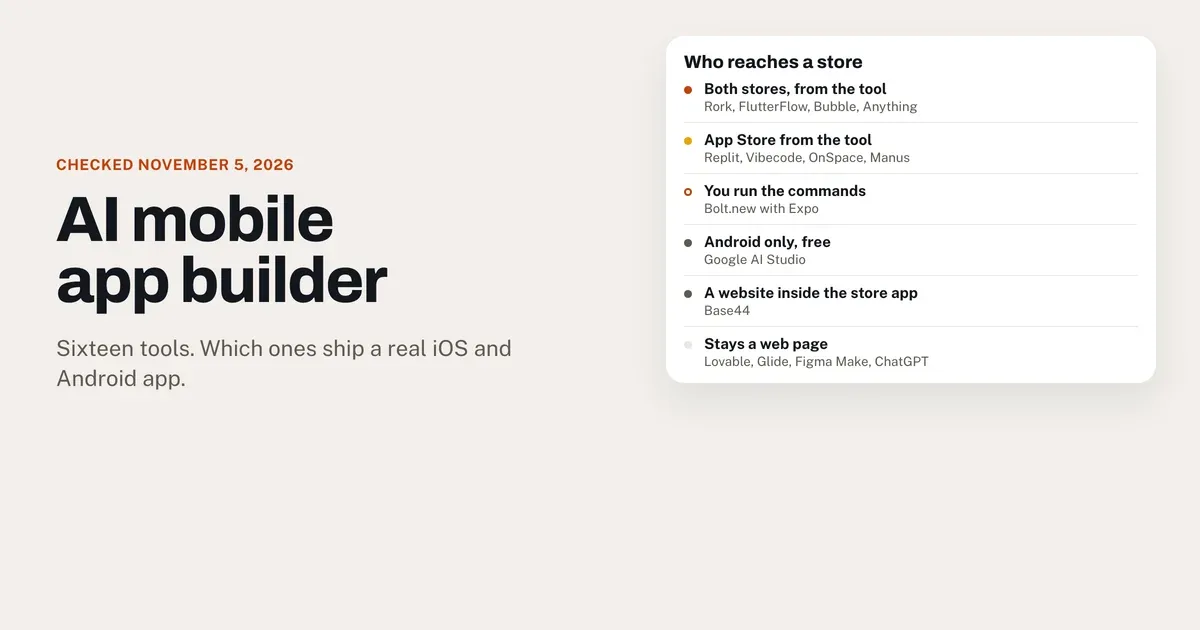
Sixteen AI mobile app builders, checked on November 5, 2026. Rork, FlutterFlow, Bubble and Anything send a native app to both stores. Lovable, Glide and ChatGPT stay a web page.

By David RieuFounder of Eqlo
You have an app idea, and every AI mobile app builder on your shortlist says "iOS and Android" somewhere on its homepage. Before you pay, you want to know one thing: will people install your app from the App Store and Google Play, or will they open a web page with an icon on it?
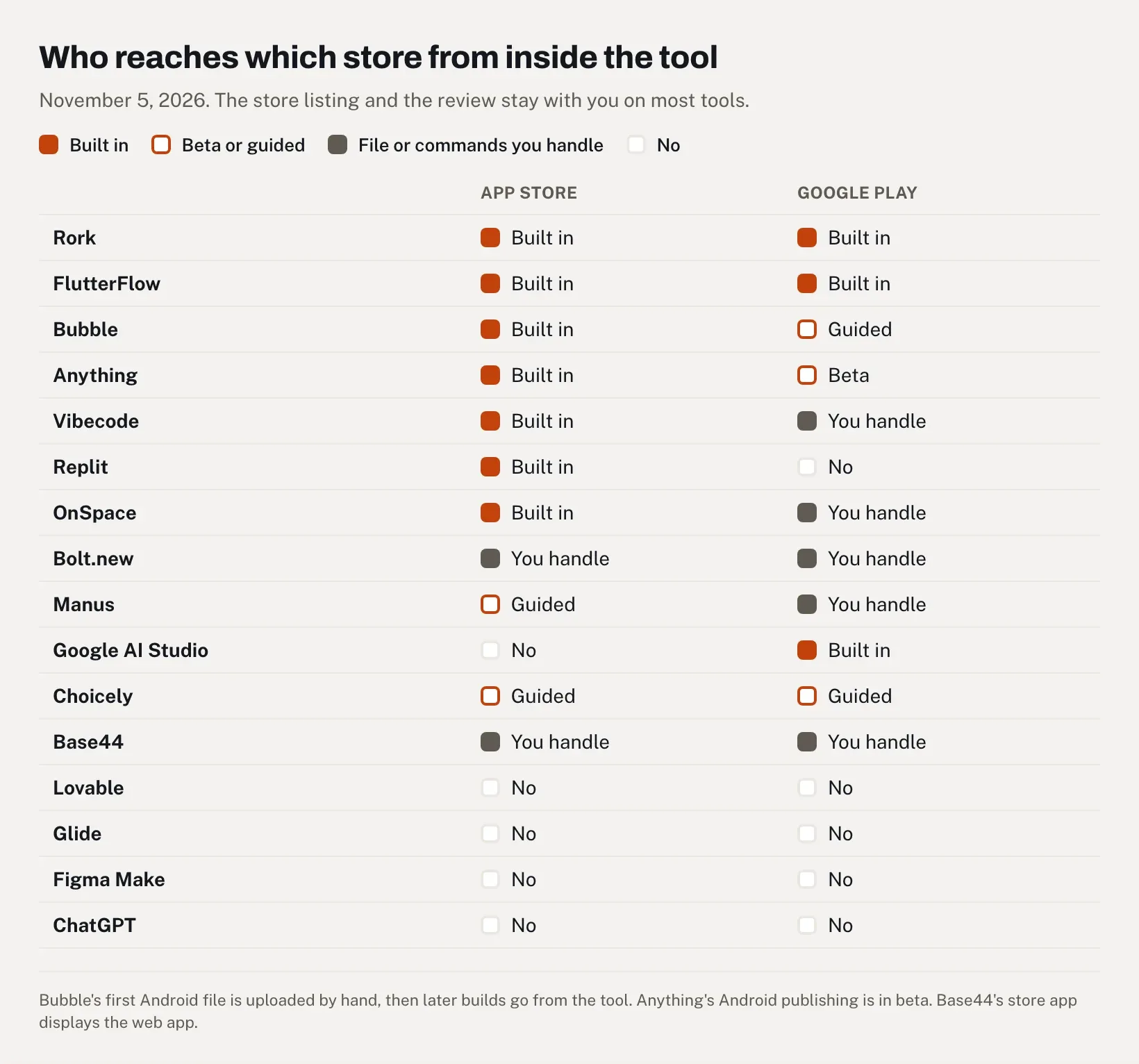
I checked sixteen tools on November 5, 2026, using their own documentation and pricing pages. Rork, FlutterFlow, Bubble and Anything build native apps and send them to both stores from inside the tool, with Anything's Android side still in beta. Replit, Vibecode, OnSpace and Manus handle the App Store upload and leave Google Play to you. Bolt.new reaches both stores through Expo commands you run yourself, Google AI Studio covers Android alone for free, and Choicely makes native apps for content. Base44 ships a store app that displays your web app. Lovable, Glide, Figma Make and ChatGPT stay on the web.
One thing before you read on: I founded Eqlo, which competes with every tool here. Eqlo's phone app is a website inside a native wrapper, the same family as Base44, and it gets its own section near the end, outside the list. I've put an app in both stores with Eqlo. On the other tools, my view matches what their users write in public, so I quote those users, with dates and links.
What each AI mobile app builder ships
In the table, "native" means the app draws the phone's own buttons and lists from Swift, Kotlin, Flutter or React Native code, and "wrapper" means a store app that displays web pages. "Built in" means the tool itself sends the signed build to App Store Connect or Google Play Console, the portals where Apple and Google receive apps.
| Tool | What's inside the app | App Store | Google Play | Free plan | Cheapest plan for a store build |
|---|---|---|---|---|---|
| Rork | Native: Swift for iPhone, Kotlin for Android | Built in, no Mac | Built in, to internal testing | Design mode only | Pro, $20/mo |
| FlutterFlow | Native: Flutter | Built in, one click | Built in, one click | 2 projects, no store deployment | Basic, $39/mo ($351 billed yearly) |
| Bubble | Native: React Native | Built in | First file by hand, then built in | Build and test on a phone | Mobile Starter, $42/mo billed yearly |
| Anything | Native: React Native (Expo) | Built in, through TestFlight | Beta, to internal testing | No app builds | Pro, $24/mo ($19 billed yearly) |
| Vibecode | Native: Swift for iPhone, or React Native for both | Built in, submitted for review | Download the code on Pro and upload it yourself | First build free | Plus, $20/mo |
| Replit | Native: React Native (Expo) | Built in | Not supported yet | Lite build, published app offline after 30 days | Core, $20/mo ($18 billed yearly) |
| OnSpace | Native: React Native (Expo) | Built in, 1,000 credits per publish | Not supported; AAB file on Pro | 500 credits a day, 2,000 a month | Pro, from $25/mo for the Android file |
| Bolt.new | Native: React Native (Expo) | Expo commands on your computer | Expo commands on your computer | 1M tokens a month | $0 with Expo's free plan |
| Manus | Native: React Native (Expo) | Uploaded for TestFlight, you submit | AAB file you upload | Limited free credits | Paid plan |
| Google AI Studio | Native: Kotlin, Android only | No | Built in, to internal testing | Free | $0 |
| Choicely | Native: Swift and Java, for content apps | Publish Assistant, on Premium | Publish Assistant, on Premium | 150 credits a month | Premium, $25/mo |
| Base44 | Wrapper: your web app in a web view | Signed file you upload | Signed file you upload | Store-readiness scan only | Builder, $40/mo billed yearly |
| Lovable | Web app, installable as a PWA | No | No | Yes | n/a |
| Glide | Web app (PWA) | No | No | Build only, publishing is paid | n/a |
| Figma Make | Web app | No | No | Starter publishes through Figma Community | n/a |
| ChatGPT | Web app (Sites) | No | No | Not on Free or Go | n/a |
Prices checked on November 5, 2026, in US dollars before tax. Every store route also needs Apple's Developer Program at $99 a year (Apple) and Google Play's one-time $25 registration fee (Google). Even when the upload is built in, the store listing and the final click on "submit for review" usually stay with you.
Four things that get called an app
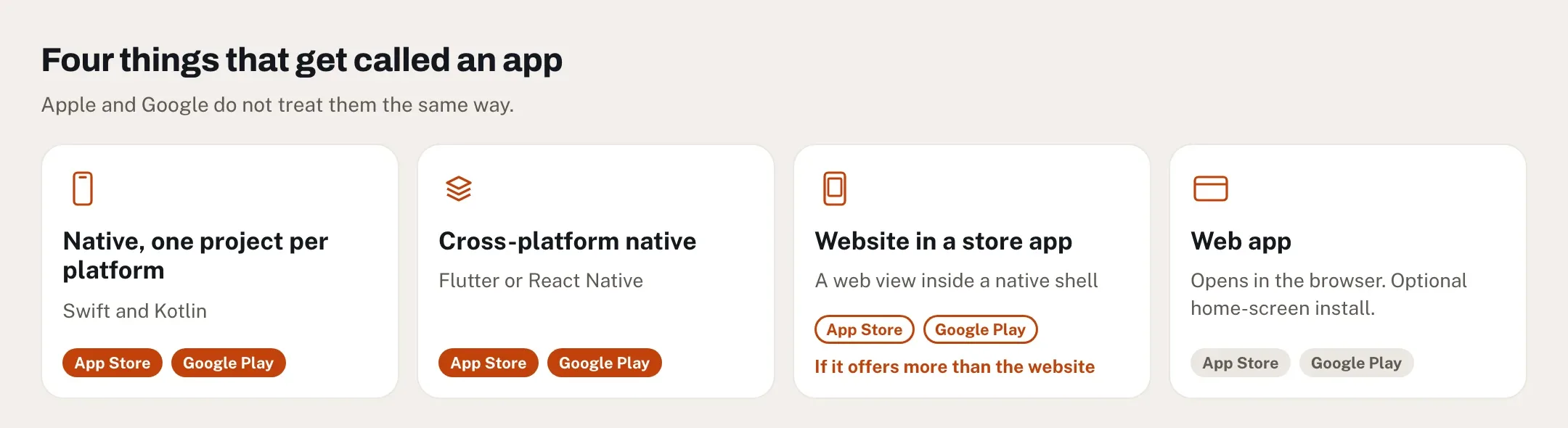
Behind the phone-shaped preview, an AI mobile app builder hands you one of four things, and Apple and Google don't treat them the same way.
- Native code, one project per platform. Swift for iPhone, Kotlin for Android. Rork works this way on both platforms, Vibecode on iPhone and Google AI Studio on Android.
- Cross-platform native code. One codebase in Flutter or React Native draws real iPhone and Android components. FlutterFlow uses Flutter. Bubble, Replit, Anything, Bolt.new, OnSpace, Manus and Vibecode's mobile projects use React Native, almost all of them through Expo, a toolkit and build service for React Native apps.
- A website in a store app. The app you download shows web pages full screen, under its own icon. Base44 works this way, as do wrappers made with tools such as Capacitor, and so does Eqlo.
- A web app. It opens in the browser and, on some tools, installs on the home screen as a progressive web app (PWA). It never goes through a store or a review. Lovable, Glide, Figma Make and ChatGPT Sites build this kind.
Here's the catch with the word "native." React Native is a real native framework, yet a React Native app whose only screen is a WebView (a frame that loads a website) is still a website in a wrapper. Eqlo's store app is built exactly like that: an Expo project that opens your published site. So "built with React Native" on a pricing page describes the shell and tells you nothing about what's inside.
Apple looks at what's inside. Guideline 4.2 reads: "Your app should include features, content, and UI that elevate it beyond a repackaged website. If your app is not particularly useful, unique, or 'app-like,' it doesn't belong on the App Store" (App Review Guidelines). Apple's review page is blunter: "Websites served in an iOS app, web content that is not formatted for iOS, and limited web interactions do not make a quality app" (App Review). Native code doesn't buy a pass either. Replit's own checklist warns that "using a native framework alone does not satisfy Apple's minimum functionality requirements" (Replit docs).
Google cares less about the technique. Its spam policy bans apps whose main purpose is to "provide a webview of a website without permission from the website owner or administrator" (Play policy). Your own site in an app is allowed.
How to tell what a tool ships before you pay
Homepages blur this. The documentation usually settles it in a few minutes:
- Search the docs for "web view," "WebView," "wrapper," "Capacitor" and "PWA." Base44's store guide says it outright: "Your mobile app runs your published Base44 app inside a secure web view."
- Look for the file names. An IPA (iPhone) and an AAB (Android App Bundle) mean a store build exists. A link on the tool's own domain means a web app.
- Check who uploads the file. Some tools send it to Apple and Google for you, while others hand you a file or a list of terminal commands.
- Check the plan. On almost every tool in the table, store builds sit behind a paid plan.
How we checked
- Sources. Each tool's documentation and pricing page, read on November 5, 2026 without signing in. When a marketing page and the docs disagree, the docs win. Manus's mobile page says its apps "can be submitted to Google Play Store," while its publishing page says it packages a file you upload yourself and "does not publish it live for you" (Manus).
- What "built in" means. The tool sends a signed build to App Store Connect or Google Play Console. A file you upload or a command you type counts as manual.
- The same five questions for every tool. What's inside the app, how it reaches each store, what the free plan allows, the cheapest plan that ships, and what users report.
- User reports. Reddit threads and official forums, quoted with their dates. Plenty of replies in these threads come from people who sell a tool, and I point it out when it shows.
- What I didn't do. Build the same app in all sixteen tools. Hands-on use would show how many credits a booking flow burns, and the entries flag where that gap matters.
Ten tools that produce a store build
Every AI mobile app builder in this section produces a file Apple or Google can review. They're ordered from the most built-in route to both stores to the most manual, and Base44 closes the list because its store app is a wrapper.
1. Rork: two native apps, built without a Mac
Rork is the shortest route here from a sentence to both stores, if you won't touch code. It also changed under its users this year. "You can no longer create Expo (React Native) projects in Rork," its docs say. "New apps are native iPhone (Swift), native Android (Kotlin), or web," because on Rork's internal benchmarks "the agent wrote better Swift apps than React Native apps" (Rork docs). Both apps live in one project, with one backend, so they share the same database when the project uses Rork Cloud or Supabase. They're still two codebases, and Rork says so: "The two apps can still drift."
For the App Store, Rork builds and uploads the app on its own machines, so you need neither a Mac nor Xcode, and you finish the listing in App Store Connect. For Google Play, it builds and signs the AAB and can send it to internal testing once you've created the app in Play Console (publishing FAQ). The free plan is design mode only, with 5 credits a day, and "building and publishing an app needs Rork Pro ($20/mo) or Rork Max (from $200/mo)" (subscriptions). Pro includes 100 credits a month, extra credits cost $0.22 each, and the cloud simulator spends credits by the minute.
User reports split, and part of them describe the old Expo version, so check the date on any review you weigh. A March 2026 post on r/AskVibecoders, "Rork works great. until you try to ship an actual app.", says "the context degrades fast once the app grows beyond a handful of screens" and that Rork "absolutely failed building it after spending ~$500 on it." A reply in the same thread, dated March 14: "No deployment issues here. I have 4 apps submitted already."
Best for: you don't code, you want both stores, and $20 a month fits. Our Lovable alternatives comparison also puts Rork next to the web builders.
2. FlutterFlow: Flutter code, one click to each store
FlutterFlow now sells two ways to build on one plan. The new FlutterFlow is AI-first: "Describe what you want to build, and an agent handles the implementation while you guide the result," with "app store deployment built in," according to its announcement. FlutterFlow Studio is the visual editor that used to carry the FlutterFlow name, where you place screens and logic yourself. Either way you get a Flutter app, one codebase for iPhone, Android and the web.
The free plan gives you 2 projects, without code download, APK files, one-click store deployment or push notifications. Basic, at $39 a month or $351 billed yearly, adds all four (pricing). Pro costs $80 a month and Max $150.
When the one-click deploy seems to stall, the delay can sit on Apple's side. On r/FlutterFlow in February 2026, a builder (whose post has since been deleted) saw a build marked "Finished" in FlutterFlow that never reached App Store Connect. The top reply described the same experience: the build "took several hours before it finally appeared in App Store Connect," with no redeploy needed. When r/nocode asked for the best AI mobile app builder in August 2025, the shortest answer was "Native mobile + AI => flutter flow."
Best for: you'll learn an editor to control every screen, and you want Flutter code a developer can take over later.
3. Bubble: React Native, on the same backend as your web app
"Bubble builds true native iOS and Android apps, without wrappers," its mobile guide says. They run on React Native and "share one backend and database with your web app" (Bubble blog). Bubble's AI Agent can generate the mobile app as well, a feature still in beta.
Bubble uploads iPhone builds to App Store Connect for you, and its iOS guide warns that a build "can take up to 45 minutes." Android is clumsier the first time. "Your first deployment is expected to fail," the manual says, because that's how Bubble produces the first AAB, which you download from an email and upload to Play Console by hand. After that, Bubble uploads new builds itself (Google Play guide). Bug fixes, text changes and layout tweaks then reach phones as over-the-air updates, without a new store submission, while a new icon or plugin needs a new build.
The free plan builds and tests on a phone. Store builds start with Mobile Starter at $49 a month, or $42 billed yearly, and Web & Mobile Starter costs $69, or $59 billed yearly (pricing plans). The plan counts builds: 10 during the first three months, then 5 a month. If you stop paying, the live versions of your app are paused.
Bubble's own forum is the frankest source on reliability. The first reply to "Can I ship a reliable app with Bubble Mobile?" in February 2026 read: "Quick answer is NO… Although it looks like promising developments are being made." The same reply said you would still "need a web-app as a back up interface" to fill the gaps in native features. In July 2026, a company described its live app stuck on an endless loading screen for up to five days in a row (forum thread). Test on real phones, Android ones included, before you commit.
Best for: your web app already runs on Bubble and you want the phone app on the same data.
4. Anything: Expo apps, paid from the first build
Anything generates Expo apps and previews them in Expo Go, which needs a free Expo account and an access token. For the App Store, it runs a check for common review problems, builds the app and uploads it to TestFlight in about 30 minutes. Google Play publishing is labeled beta and sends the app to internal testing as a draft.
There's no free way in: "Building an app requires a paid plan." Pro costs $24 a month, or $19 a month billed yearly, with 20,000 credits (subscriptions). If you drop back to the free plan, the docs say, "Publishing to custom domains and mobile app stores is disabled."
I found little first-hand public feedback on Anything's store flow, so this entry rests on its documentation.
Best for: one tool for both stores, if you can wait for the Android side to leave beta.
5. Vibecode: native Swift for iPhone, Expo for Android
Vibecode asks you to choose at the start. An "iOS app" is a native Swift and SwiftUI project compiled on Vibecode's cloud Macs, and Vibecode builds it, uploads it and submits it for App Store review. A "Mobile app" is a React Native and Expo project for iPhone and Android; it reaches App Store Connect through Expo, and you send it for review yourself. Google Play isn't built in: "on the Pro and Max plans you can download the code and publish it on Google Play with your own Play Console account" (publishing guide).
New accounts get their first app build free. Plus costs $20 a month and includes App Store submission, without the source code; Pro, at $50, adds the code. Vibecode warns that its tiers are "experimental and may evolve" (pricing).
A 2026 "honest ranking" of AI app builders on r/AskVibecoders put Vibecode first because "deployment actually works." Rankings like this one are common in tool subreddits, and you rarely know who wrote them, so give it little weight.
Best for: an iPhone app first, in native Swift, with Android as a later project.
6. Replit: App Store built in, Google Play not yet
Replit's Agent builds Expo apps that you preview on your phone through Expo Go, or in a cloud simulator on the Core plan and above (mobile apps). Its Launch feature builds, signs and uploads the iPhone app to App Store Connect, which "can take up to 45 minutes," and the build then shows up in TestFlight. On Android, the same docs are plain: "Publishing to Google Play is not yet supported by Replit."
The free Starter plan works in "Lite build" only, and its published app "will automatically go down after 30 days" (Starter plan). A store app needs its backend online all the time, so plan on Core, at $20 a month or $18 billed yearly (pricing).
Replit's submission checklist is the clearest page in this list about review. It asks you to test the main flow on a real iPhone through TestFlight, give the reviewer a working demo account and add account deletion if people can sign up. Then it sets expectations: review is "often a day or two," and "rejections are common and you can resubmit right away."
Best for: iPhone first, with a real server and database. Our Replit Agent review covers the web side, and Lovable vs Replit compares the two on one brief.
7. Bolt.new: the cheapest route, if a terminal doesn't scare you
Bolt.new builds an Expo app when you ask for a mobile app, and you test it in Expo Go. Publishing happens outside the browser. Bolt's guide has you download the code, install Node.js and Git, run npm install -g eas-cli, then eas login, eas init, eas build:configure and eas build --platform ios --auto-submit (Bolt and Expo). You'll need an Expo account and both developer accounts.
It's work, and it's also the cheapest route to the App Store in this list. Bolt's free plan gives 1 million tokens a month, and Expo's free plan includes 15 iOS and 15 Android builds plus store submission (Expo pricing). The catch is Expo's free queue: "At peak times, you may experience wait times of 90+ minutes." Bolt Pro costs $25 a month.
In June 2025, a builder posted "From Zero to Monetized iOS App in 10 Hours with Bolt.new, Expo, & RevenueCat" on r/boltnewbuilders. The post has since been deleted, but the author's replies remain: "npx expo doctor mostly fixed it," about the broken dependencies, and App Store review "is very unpredictable and can take longer so I got a bit lucky." Another commenter pointed out that testing in-app subscriptions needs an Expo development build, which, as far as he knew, Bolt couldn't produce yet.
Best for: you're at ease in a terminal, or a developer friend is. Our Bolt.new review covers tokens and code.
8. OnSpace: App Store for credits, Android by download
OnSpace builds React Native and Expo apps. Its App Store flow asks for your Apple Developer email and password, which it says are "stored locally on your computer," and charges 1,000 credits. The build "typically completes in less than 2 minutes," then goes to App Store review automatically (App Store docs). For Android, the same page says: "At this time, direct publishing to the Google Play Store is not supported." OnSpace's docs reserve the Android file for Pro users, at 500 credits a build.
The free plan gives 500 credits a day, capped at 2,000 a month, and its projects are public. Pro starts at $25 a month, with up to 7,500 credits, according to OnSpace's documentation.
Best for: getting an iPhone prototype in front of Apple's reviewers fast, when Android can wait.
9. Choicely: native apps for content, sports and events
Choicely comes from a different direction: apps for sports clubs and media brands, with push notifications and content you update without a new store release. It compiles one project to a Swift app for iPhone and a Java app for Android, "not a webview wrapper or a PWA" (Choicely). Its AI can start from your website's content, and you refine the result in a drag-and-drop editor.
Building and previewing are free, with 150 credits a month plus 100 bonus credits at sign-up, push notifications included. "You only need to pay when you're ready to publish it to the world," says the pricing page. Premium, at $25 a month, adds the Publish Assistant, which prepares the listings and submits to both stores from your own developer accounts. Business costs $50 a month, and Enterprise is a done-for-you service priced per project.
Best for: a sports club or a media brand that wants news and schedules with push alerts in a native app, more than custom business logic.
10. Base44: your web app inside a store app
Base44 is upfront about the format: "Your mobile app runs your published Base44 app inside a secure web view. This is a lightweight native wrapper around your web app that opens only your app's URL" (store guide). Content changes show up without a new store version, and you can add push notifications when you generate the files, with an Apple push key and Firebase.
The store-readiness scan works on the free plan. Downloading the signed IPA and AAB needs Builder, at $40 a month billed yearly, and you upload both files yourself, in App Store Connect and Play Console.
Expectations cause most of the trouble. A Trustpilot reviewer in October 2026 paid $1,344 for a yearly plan expecting real access to contacts, calendar and two-way audio, and got "a webview-based web application" instead; our Base44 review has the details. A wrapper is also the format Apple's guideline 4.2 looks at hardest, as the review section below explains.
Best for: an internal tool, or a web app your users already know, when the store listing matters more than phone features.
The tools that stay a web page
These four build web apps, some of them very good ones. None of them hands you a store file.
Lovable. Its publishing FAQ is direct: "Lovable builds web apps and publishing always deploys to a web URL," and it "has no built-in flow that packages and submits your project to the App Store or Google Play" (Lovable docs). It suggests a PWA, or a Capacitor wrapper built "outside of Lovable," and it "does not generate projects in React Native." The Lovable app on your phone is for building projects and "does not turn your project into a native app for end users." Our Lovable review covers what it does well, and our Lovable alternative page compares it with Eqlo.
Glide. "Glide apps are Progressive Web Apps (PWAs), and publishing directly to the App Store or Google Play is not supported" (Glide help). Glide pitches itself for internal business apps, where a home-screen app shared with a team does the job; our page on building internal tools covers the same need.
Figma Make. Publishing puts your app on a figma.site address or your own domain (Figma help). A reply on Figma's forum says Make "is designed for creating web applications and doesn't currently support building native iOS or Android apps."
ChatGPT. It builds web apps too, with Sites, and the ChatGPT section below has the details.
You can wrap any of these in Capacitor yourself. That's also how many guideline 4.2 rejections begin, as the Apple section shows.
Honorable mentions
- Google AI Studio. Free native Android apps in Kotlin, with a built-in upload to Google Play's internal testing track. The Android section below covers it.
- Manus. It builds Expo apps, uploads the iPhone build to App Store Connect for TestFlight and packages an AAB you upload yourself. A paid plan is needed "to build and deploy complete applications" (Manus).
- Dyad. Free and open source, it runs on your computer with your own AI key, and its creator says its mobile guide leads to both stores. The free section below has the caveat.
- Median and Capacitor. Wrapper tools that turn an existing web app into store files. They give you the files and leave you the guideline 4.2 risk.
Best AI mobile app builder for your situation
For most people who don't code and want both stores, the best AI mobile app builder today is Rork: native Swift and Kotlin apps, built and uploaded without a Mac, from $20 a month. FlutterFlow is the better pick if you want a visual editor and the code. Bubble wins if your web app already lives there.
The "best AI app builder" lists that rank on Google mostly test web builders and give mobile a paragraph. Matching the tool to what you're building gives a better answer:
- No code, both stores: Rork Pro, $20 a month.
- A visual editor and Flutter code: FlutterFlow Basic, $39 a month.
- A web app already on Bubble: Bubble Mobile Starter, $42 a month billed yearly.
- iPhone first, in native Swift: Vibecode Plus, $20 a month, or Rork.
- iPhone first, with a real server: Replit Core, $18 a month billed yearly.
- Android only, almost no budget: Google AI Studio, free, plus Google's $25.
- The lowest cash cost for both stores: Bolt.new with Expo's free plan, if you can run terminal commands.
- A content app for a club or a media brand: Choicely Premium, $25 a month.
- A website and its app on one database: Eqlo, our tool, described below.
Free AI mobile app builder: what $0 actually gets you
Almost every AI mobile app builder here lets you build and test for free. Putting the app in a store costs at least Google's one-time $25 for Android and Apple's $99 a year for iPhone, and most tools add a subscription. The only routes I confirmed without one are Google AI Studio for Android and Bolt.new with Expo's free plan.
Each free plan stops somewhere short of the store:
- Rork's free plan stops at design mode.
- FlutterFlow's free plan has no store deployment.
- Bubble's free plan tests on a phone and submits no builds.
- Anything needs a paid plan to build a phone app at all.
- Base44 keeps the signed files for Builder and up.
- Replit's free published app goes offline after 30 days, which a store app can't afford.
- Vibecode gives one free build, then $20 a month.
Reddit reached the same verdict early. In r/nocode's "Truly free ai app builder?" (February 2025, 252 comments), a beginner with no coding experience wanted a free tool for a food and workout app, "with the ability to get to the App and play stores once I'm done." One of the most upvoted replies asked what "truly free" means when these are businesses, and answered: "Spoiler: there's none." Further down, in February 2026, a link to a supposedly free Android builder drew a reply calling it a phishing site, so treat "free" offers in these threads with suspicion.
One genuinely free option does come up in that thread: Dyad, recommended there in September 2025 by its creator, who signed "(disclosure: I'm the creator of Dyad)." It runs on your computer, and a free Google Gemini API key is enough to start, according to him. You become your own support, though. In December 2025, a user in the same thread wrote that following the AI's terminal advice had broken his Xcode setup.
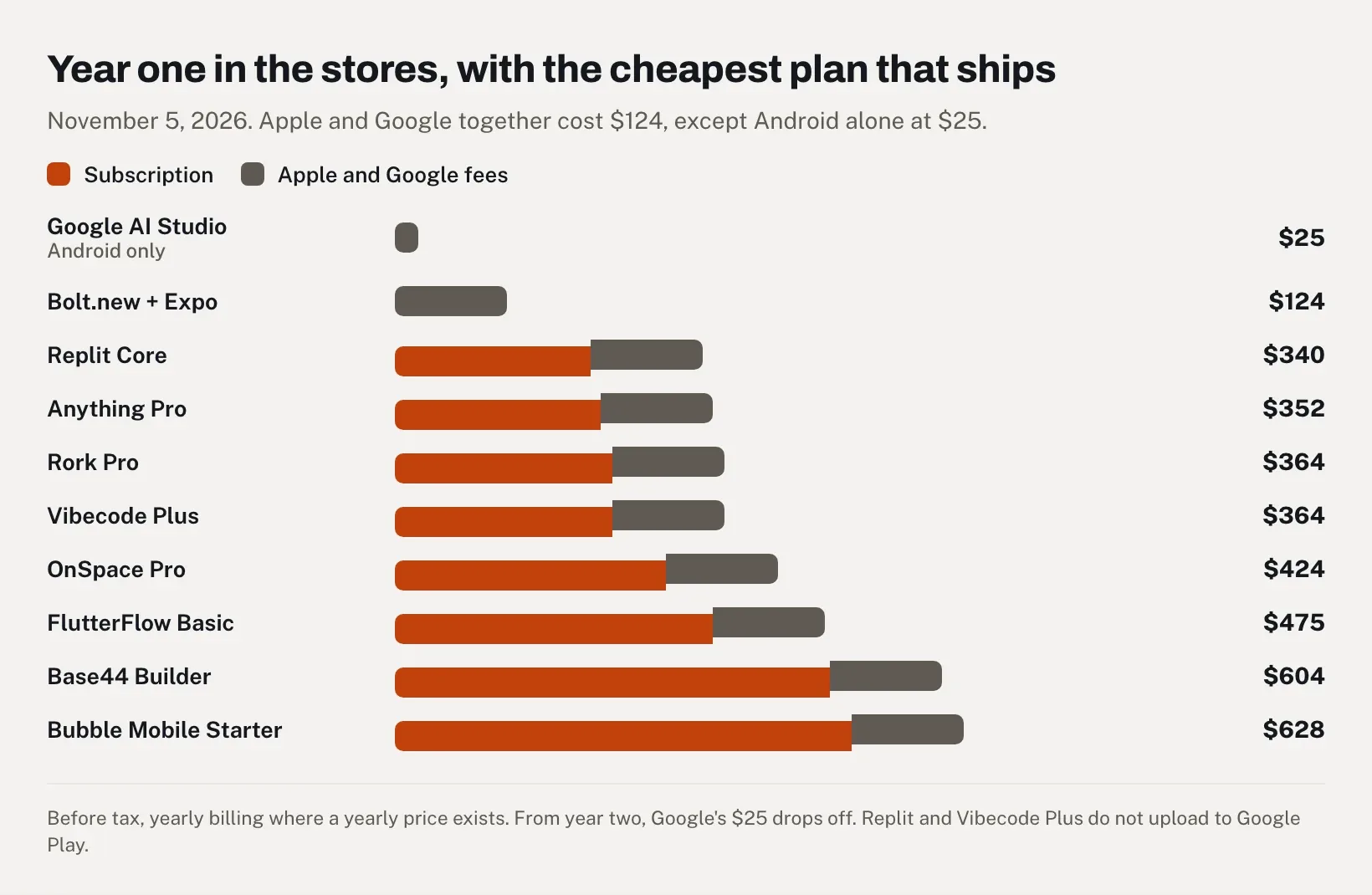
Here's the first year in both stores with the cheapest plan that gets there. Apple and Google together cost $124 ($99 + $25):
| Route | Store uploads from the tool | 12 months of subscription | Apple + Google | Year one |
|---|---|---|---|---|
| Google AI Studio | Android only | $0 | $25 | $25 |
| Bolt.new + Expo, free plans | Both, by command | $0 | $124 | $124 |
| Replit Core, billed yearly | App Store only | $216 ($18 × 12) | $124 | $340 |
| Anything Pro, billed yearly | Both, Android in beta | $228 ($19 × 12) | $124 | $352 |
| Rork Pro | Both | $240 ($20 × 12) | $124 | $364 |
| Vibecode Plus | App Store only | $240 ($20 × 12) | $124 | $364 |
| OnSpace Pro | App Store, Android by file | $300 ($25 × 12) | $124 | $424 |
| FlutterFlow Basic, billed yearly | Both | $351 | $124 | $475 |
| Base44 Builder, billed yearly | Neither, files you upload | $480 ($40 × 12) | $124 | $604 |
| Bubble Mobile Starter, billed yearly | Both, first Android file by hand | $504 ($42 × 12) | $124 | $628 |
Prices checked on November 5, 2026, before tax. From the second year, Google's $25 drops off, while Apple's $99 renews every year. On the two "App Store only" rows, Google Play means extra work: Replit doesn't support it, and Vibecode wants Pro ($50 a month) before you can download the code.
Can ChatGPT build an app?
Yes, if a web app is enough: ChatGPT Sites builds the app, tests it, deploys it and returns a link, on paid plans such as Plus and Pro. For the App Store or Google Play, no. ChatGPT can write Expo or Swift code, but building and submitting the app happen outside it, with Expo and your own developer accounts.
OpenAI's own page puts it this way: "Ask ChatGPT to create an app, and it can build the project, run it for testing, deploy it, and return a URL you can share," for anything from "static sites to full-stack JavaScript or TypeScript web apps" (ChatGPT use cases). "Sites is not available on Free or Go," says the Help Center. Building and editing a site count toward your Codex usage, and "Hosting is free through December 31, 2026," with metering from January 1, 2027 for usage beyond your plan's allowance (Sites docs).
For a phone app, the ChatGPT route looks like Bolt.new's with more copy and paste: ask for an Expo project, run it in Expo Go, then use Expo's build and submit commands with your Apple and Google accounts. That's vibe coding by hand. You can do it without being a developer, though every error sends you back to the chat, a round trip that Bolt.new and Replit automate.
React Native or Flutter: does the framework matter?
Less than the pricing pages suggest. Flutter (FlutterFlow) and React Native (Bubble, Replit, Anything, Bolt.new, OnSpace, Manus and Vibecode's mobile projects) both produce real native apps, and Swift or Kotlin (Rork, Vibecode's iPhone projects, Google AI Studio) give you each platform's own language. For someone who doesn't code, four questions matter more than the framework's name:
- Can you take the code with you? FlutterFlow Basic downloads the Flutter project. Bolt.new's Expo project downloads on the free plan, Vibecode's on Pro. Google AI Studio offers a ZIP file, and Bubble keeps you in its editor. Our glossary explains repository export.
- One codebase or two? React Native and Flutter keep one. Rork keeps two and relies on its agent to keep them in step.
- Can small fixes skip review? Bubble pushes fixes and text changes as over-the-air updates, and Expo's free plan sends updates to 1,000 monthly users. A new permission or a new icon still needs a new build everywhere, as Replit's docs point out.
- Who takes over after you? One freelancer who knows Flutter or React Native can pick up the whole project. Swift plus Kotlin means two skill sets, or one developer who has both.
Android and Google Play: the 12-tester rule
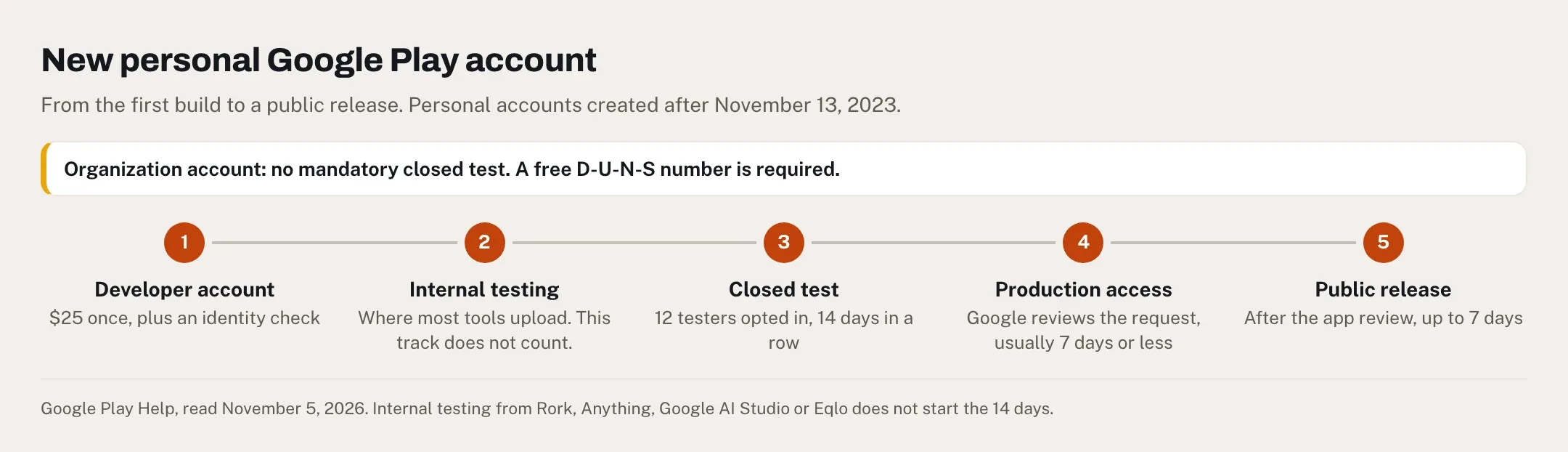
If your Google Play developer account is personal and was created after November 13, 2023, you can't publish to everyone right away. Google requires "a closed test for their app with a minimum of 12 testers who have been opted in continuously for at least 14 days," then reviews your request for production access, a review that "usually takes seven days or less" (testing requirements). Add the app's own review, which can run "up to seven days or longer in exceptional cases" (review times), and a first personal account should plan on about three weeks, sometimes more. Our glossary entry on closed testing explains the tracks.
Two details catch people. Internal testing doesn't count: the tools that "send to Google Play" (Rork, Anything, Google AI Studio and Eqlo among them) use the internal testing track, and the 12-tester clock only runs on a closed test you set up in Play Console. And Google checks engagement. In August 2025, a solo developer on r/googleplayconsole posted "Google Play's 14-day closed testing requirement is a complete nightmare": after two weeks with real testers and three bug-fix releases, Google's answer was "More testing required to access Google Play production." Replies advised recruiting more than 12 testers and adding a few every day. A March 2026 thread, "What day are you on in 12 Testers Hell?", sums up the hunt for testers in one line: "Day 3: My mom has an iPhone."
The rule names personal accounts only, so organization accounts skip it. They need a D-U-N-S number, which Google notes is free to get from Dun & Bradstreet (account types). A business or a nonprofit should open an organization account from the start, and our nonprofit app page covers that case.
For an Android-only app, Google AI Studio is the simplest start. Its agent "generates a complete Kotlin and Jetpack Compose project" that runs in an emulator in your browser, installs on your phone over USB and publishes to Google Play's internal testing track. The app is "client-side only," with Firebase for data and sign-in (AI Studio docs), and "Google AI Studio usage is free of charge in all available regions" (pricing). The code downloads as a ZIP file, and there's no iPhone version. For the Eqlo route on Android, see our Android app guide.
Apple's review: why a website in an app gets rejected
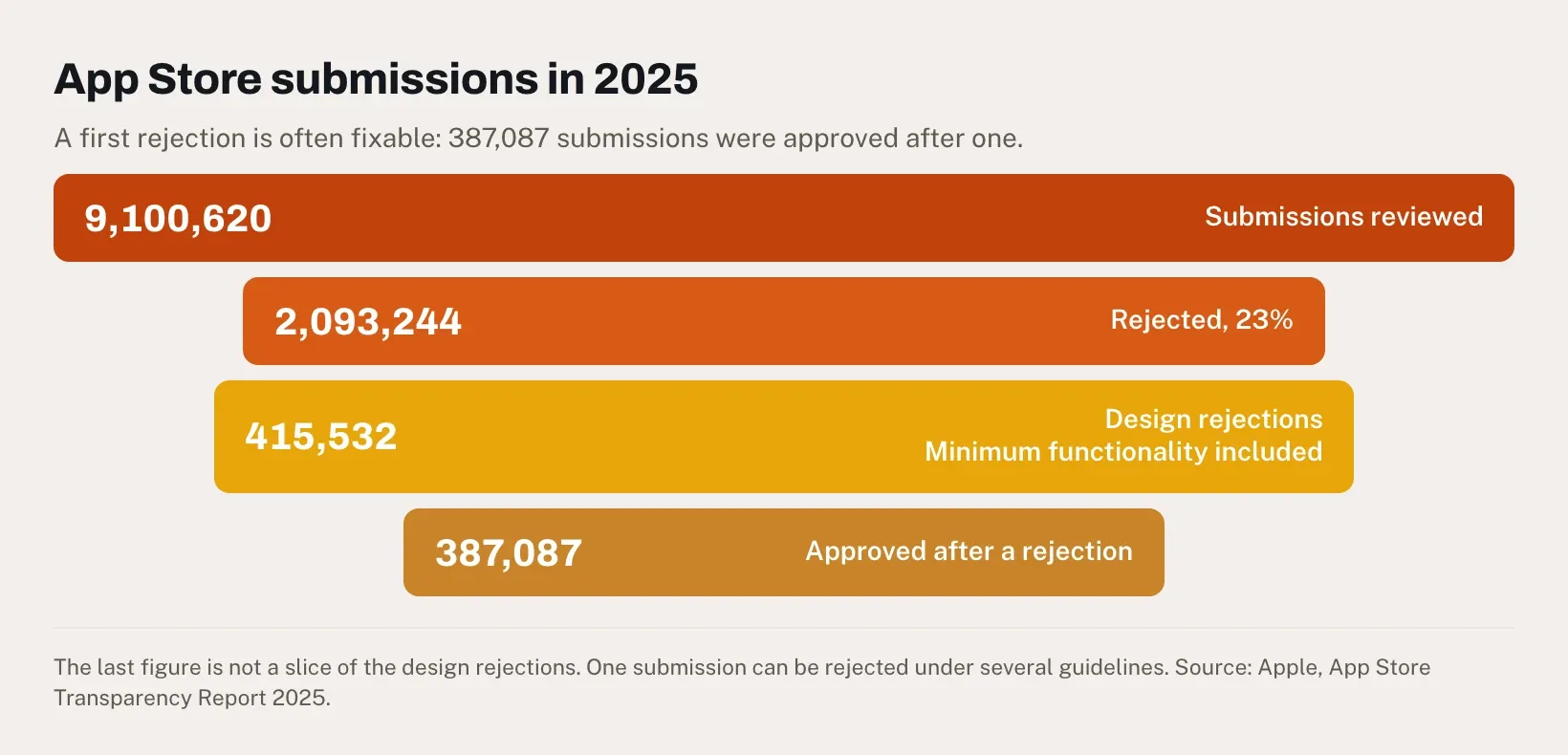
Your app runs on your phone, your friends have tried it through TestFlight, and you press Submit. Two days later, App Store Connect shows a rejection. That's ordinary. In 2025 the App Store reviewed 9,100,620 submissions and rejected 2,093,244 of them, or 23% (2,093,244 ÷ 9,100,620), according to Apple's transparency report. Design rejections numbered 415,532, about one rejection in five (415,532 ÷ 2,093,244 = 19.9%), and Apple's footnote says that category covers copycats and spam as well as "apps with minimum functionality." One submission can be rejected under several guidelines. And 387,087 submissions were approved after a rejection, so a first "no" is often fixable.
Apple ties the volume to AI. "As powerful AI development tools drive a surge in app submissions," its App Review team evaluated more than 9.1 million submissions in 2025, and Apple says it now uses AI to "analyze app similarity" (Apple Newsroom, May 20, 2026).
Four guidelines keep coming back with AI-built apps:
- 4.2, minimum functionality. Beyond the text quoted earlier, 4.2.2 says "apps shouldn't primarily be marketing materials, advertisements, web clippings, content aggregators, or a collection of links." On September 17, 2026, a developer posted exactly that rejection on r/appledevelopers, for a client app already live on Google Play: Apple wrote that it "only includes links, images, or content aggregated from the Internet with limited or no native functionality." One reply: "Apple is starting to reject websites wrapped in a native app. Google doesn't care (yet)."
- 4.2.6, apps from a generation service. Apps "created from a commercialized template or app generation service will be rejected unless they are submitted directly by the provider of the app's content." That's why every tool in this list publishes through your own Apple account, and why you should refuse anyone who offers to publish your app under theirs.
- 2.1, completeness. "On average, over 40% of unresolved issues are related to guideline 2.1: App Completeness," Apple says, a category that covers crashes and missing review information such as a demo account (App Review).
- 4.8, sign-in. If your app uses Google Sign-In or another social login for the main account, it "must also offer as an equivalent option another login service" that limits data to name and email and lets people keep their email private. In practice, that means Sign in with Apple.
Lovable2App, a service that sells fixes for these rejections, wrote on October 1, 2026 that guideline 4.2 is "the single most common rejection we see on Lovable apps," and quoted the reviewer's usual sentence: "Your app provides a limited user experience as it is not sufficiently different from a mobile browsing experience" (Lovable2App). One founder it describes changed only cosmetic details, such as the icon and the app name, between submissions; the fourth attempt was "Rejected in 40 minutes."
What gets a wrapped or thin app through, going by Apple's rules and those cases:
- A tab bar for the main sections, in place of the website's menu.
- Phone features inside the core task: offline screens, the camera or a scanner, the share sheet, notifications that open the right screen.
- Sign-in that stays in the app, with Sign in with Apple if you offer Google.
- A working demo account for the reviewer, and review notes that say where each feature lives.
Our glossary covers App Store review, and our App Store publishing guide walks through the listing step by step.
Two tools, two databases
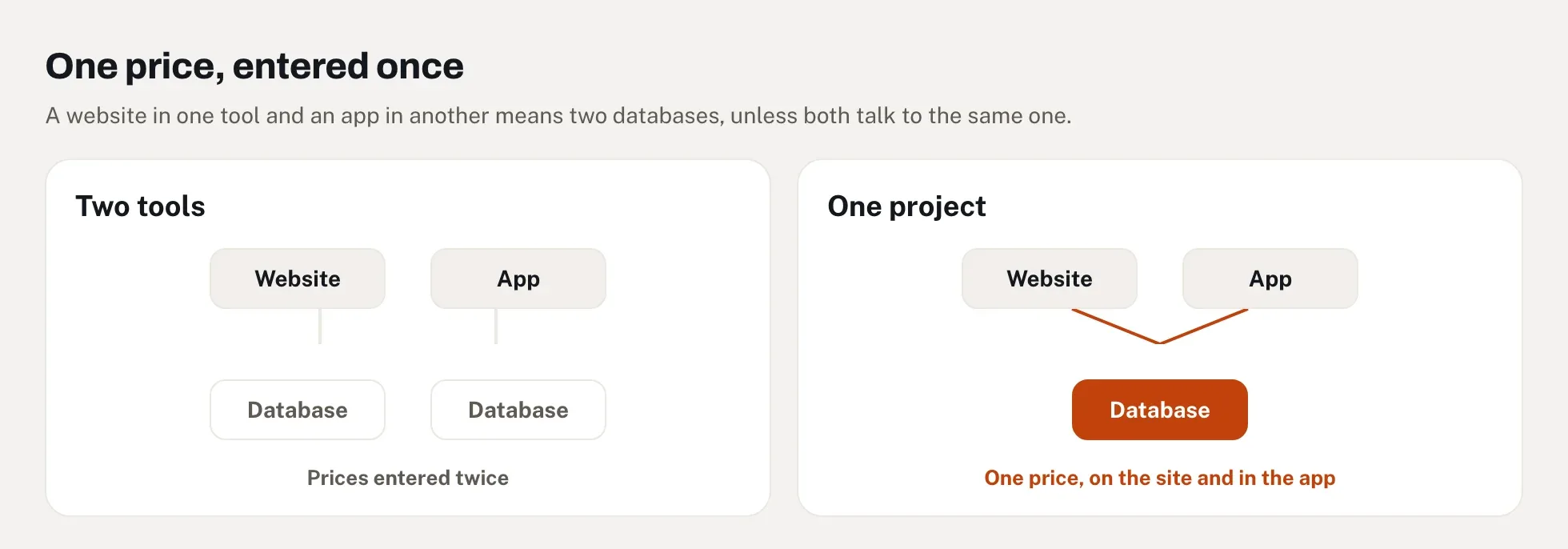
A common plan goes like this: the website in Lovable or Framer, the app in Rork or FlutterFlow. It works, and it leaves you feeding two products. Unless both talk to the same backend, every new class or member gets entered twice, and the day they disagree, a customer sees yesterday's price in the app and today's on the site.
Some tools avoid that by design. Bubble's mobile app shares "one backend and database with your web app." Rork's iPhone and Android apps reach the same database when the project uses Rork Cloud or Supabase. Base44 and Eqlo ship the published web app itself, so there's nothing to sync. If you split tools anyway, connect both to one database, a single Supabase project for instance, before you build the second front end.
The website half matters for one more reason: Google sends people to web pages, and an app with no website behind it has little to show there besides its store listing.
What Reddit says
I read about a dozen threads for this guide, and four patterns stood out.
- Recommendations scatter. In r/nocode's "Best AI mobile app builder for my needs?" (August 2025), the poster needed in-app purchases, user accounts, AI chatbots and AI voices. The replies named FlutterFlow, Replit, Rocket, Blink and Emergent, none with more than one upvote, and several read like pitches.
- Disclosures are rare. Dyad's creator signed his recommendation. Most promoters don't.
- Demos and shipping drift apart. The Rork thread quoted above is typical: the first screens come together quickly, and trouble starts as the app grows.
- The stores cause the angriest posts. The 12-tester rule and guideline 4.2 produce more frustration than any builder does.
The threads earn their keep with failure stories: the step where something broke, and the fix that worked.
Where Eqlo fits: a website and its app on one database
Eqlo is the tool I build, so read this section as the vendor's description. Eqlo starts from a website: you describe your business, it builds the site, and the same project produces the phone app, with a tab bar, a generated icon, a full-screen display and member accounts. In the stores, that app is an Expo and React Native shell that shows your published site in a native wrapper. It belongs in the same group as Base44.
That format has a clear upside. The app and the site share one database, so a price or a line of text changed on the site reaches the app as soon as you publish, with no new review. A new permission, icon or version number needs a new signed build, which goes back through review. It also has limits I'd rather state here than have you discover. The app sends no push notifications (you can declare the permission, yet the app never sends a message), and data entry needs a connection. Only screens a user has already opened stay readable offline, and games or live photo processing call for a developer, who can start from the downloadable Expo project.
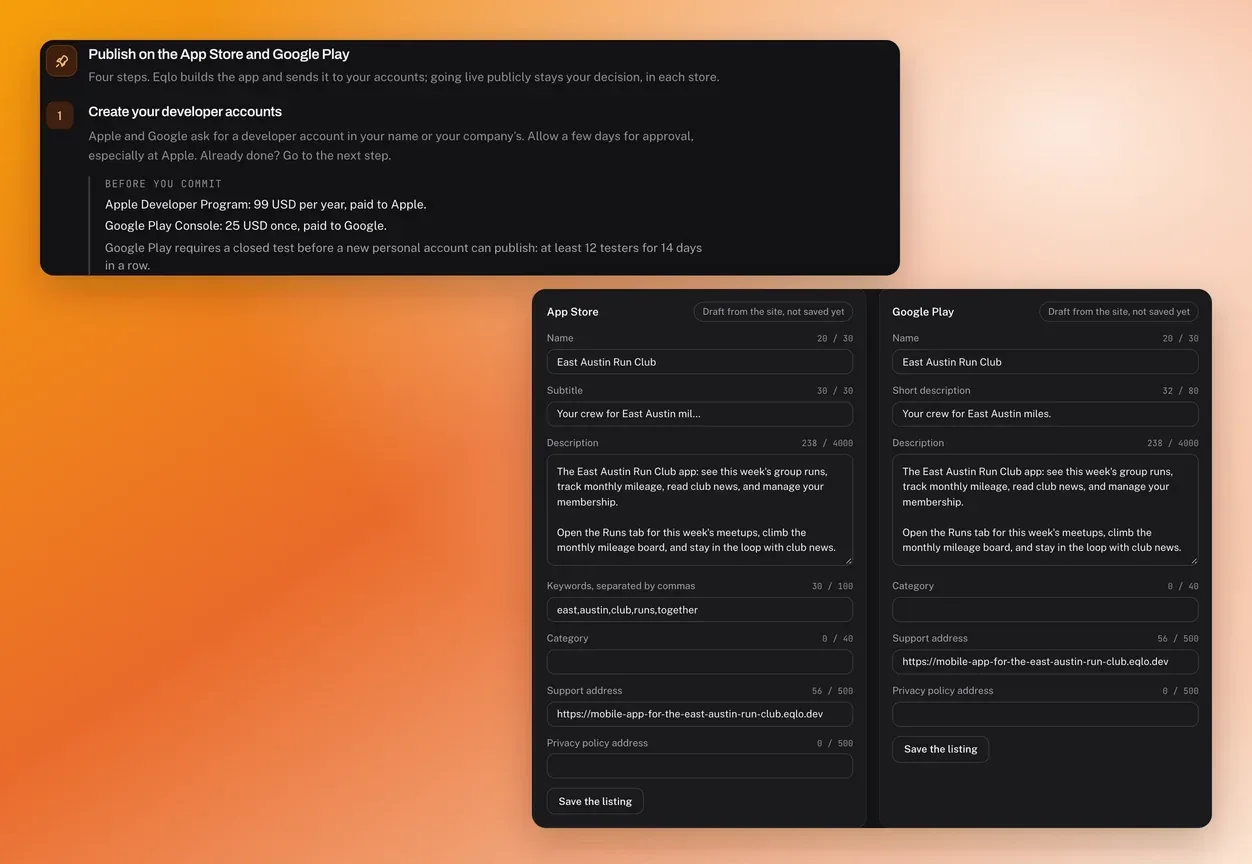
Testing is free. A QR code and a test link, valid 24 hours, revocable and with a count of how often it was opened, put the app on an iPhone or an Android phone without any Apple or Google account. For the stores, Plus ($19 a month) and Team ($49 a month) link your Apple and Google developer accounts. Eqlo then builds both signed files with no Mac or Xcode, uploads them to TestFlight and to Google Play's internal testing track, and drafts the store listing and the privacy declarations. The accounts stay in your name, as guideline 4.2.6 requires, and the Expo source downloads on every plan. Our AI app builder page shows each step.
I've put an app in both stores this way, and so far no app published with Eqlo has been rejected by either store. That guarantees nothing for yours: Apple and Google judge each app on its own, and a wrapper is the format guideline 4.2 targets. Year one on Plus comes to $19 × 12 = $228, plus $99 for Apple and $25 for Google, so $352 in all (pricing).
It fits a club, a shop, a nonprofit or a team whose people open the app often and who need the website anyway. If your app needs push notifications or offline data entry, Rork or FlutterFlow will serve you better. To try it, start free and open the app on your phone with the QR code.
Five questions before you pick a tool
Before you choose an AI mobile app builder, answer these.
Does the app need a store at all?
If it serves a group you already know, a club or a team, an installable web app may be enough, and you can share it today with no review and no fees. Stores pay off for an app people open often, and for being found in App Store search.
Which store comes first?
iPhone first points to Rork or Vibecode, or Replit if you need a server. Android alone points to Google AI Studio, with an organization account if you represent a business. Both on day one points to Rork, FlutterFlow, Bubble or Anything.
Where does your data already live?
If your web app runs on Bubble, stay there. If the site and the app must show the same prices and members, use one project for both, or one database behind two tools.
What does the main task need from the phone?
Push notifications, offline data entry, sensors or a camera in the core flow call for native code. A schedule, a catalog, a member area or a booking page works in a well-built wrapper, as long as it behaves like an app.
Who maintains it a year from now?
If a developer may take over, favor code you can export: Flutter from FlutterFlow, an Expo project from Bolt.new, Vibecode Pro or Eqlo, Swift and Kotlin from Rork, or a ZIP file from Google AI Studio. If nobody will, favor a tool where the store side stays built in.
Frequently asked questions
Which AI is best for building mobile apps?
Rork, for most people who don't code: it writes native Swift and Kotlin apps and sends them to both stores without a Mac, from $20 a month. FlutterFlow suits builders who want a visual editor and the Flutter code, and Google AI Studio is free for Android alone.
Is there a free AI app builder that publishes to the App Store?
Bolt.new with Expo's free plan comes closest, since Expo's plan includes 15 iOS builds a month and store submission at no cost. You still pay Apple's $99 a year and run Expo's commands yourself. Most tools that upload for you put that step behind a paid plan.
Do I need a Mac to publish an iPhone app?
No, with most of these tools. Rork, Vibecode, Replit, FlutterFlow, Bubble, OnSpace and Anything build the iPhone app in the cloud. Bolt.new needs a computer to run Expo's commands, and a Windows PC works for that. Our guide to building an iPhone app with AI covers the Eqlo route.
How long does it take to get an app into the App Store and Google Play?
Apple says it reviews "at least 50% of submissions in less than 24 hours and 90% in less than 48 hours." On Google Play, a new personal account first needs 14 days of closed testing with 12 testers and a production access review that usually takes seven days or less, and the app review itself can take up to seven days.
Can a web app go on the App Store?
Yes, wrapped in a native shell such as Capacitor, if it offers more than the website does: that's Apple's guideline 4.2. Google's spam policy only bans webviews of sites you don't own. If you have no phone features to add, an installable web app is often the better choice.
Is an AI app builder the same as a no-code app builder?
They overlap more every month. A no-code builder such as Bubble, Glide or FlutterFlow Studio has you place screens and logic by hand, while an AI app builder such as Rork or Replit writes the app from a description, and most no-code tools now include an AI agent too. Our page on no-code alternatives compares the two approaches.
Comparison made on November 5, 2026 from each tool's public documentation and pricing pages, Apple's and Google's rules, and the dated user reports quoted above. If a price has changed or I've got something wrong, write to hello@eqlo.app and I'll correct it.