

Framer AI review: one month on a real site, and whether the price is worth it
I spent a month on Framer with a six-page site. The first draft took half an hour, Basic was $15, and buying credits brought the month to $45, the price of Pro. What that month showed, and when Wix fits better.

By David RieuFounder of Eqlo

You've watched Framer's agent lay out a page in under a minute, and before you pay, you want to know how it holds up over a month, once the site has to go live and the credits start running down. This Framer AI review answers from the month I spent building and running a six-page site on Framer in September 2026. Framer AI is worth it for a small site where design matters, roughly three to ten pages. It pays off if you're ready to learn a design canvas and keep the agent for first drafts and hard layouts rather than every small fix.
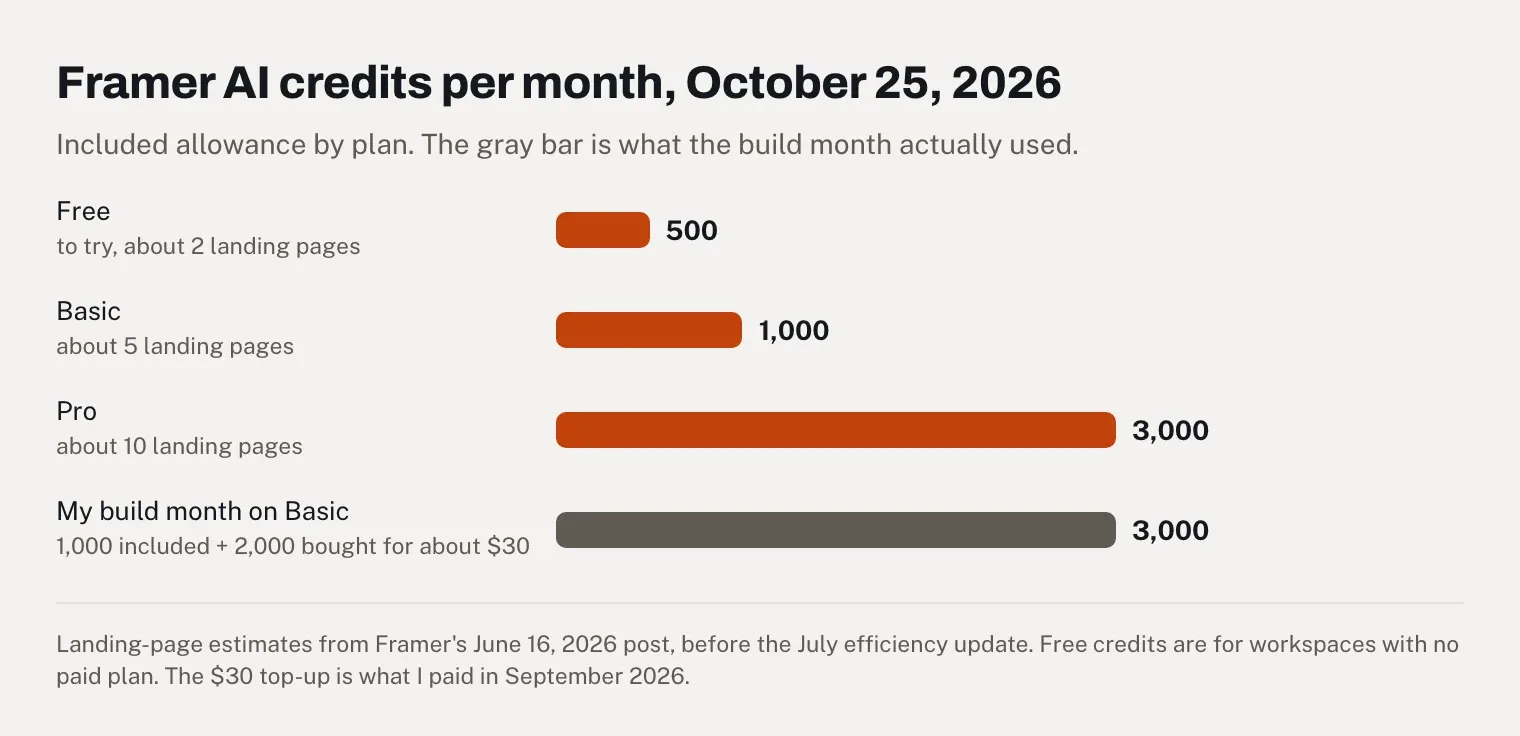
The plan itself is cheap. Basic costs $10 a month billed yearly, or $15 billed monthly, which is what I paid. Credits are where the bill grows: I ran out during the month and bought 2,000 more for about $30, so my month came to $15 + $30 = $45 before tax. That's the monthly price of Pro, which includes 3,000 credits.
I founded Eqlo, which competes with Framer, so weigh this review with that in mind. Eqlo gets one marked section near the end, and every claim about Framer links to Framer's own pages first. The site was for a made-up B2B consultancy, but it ran on a paid plan and my own domain for the whole month. Figures from other users come with their dates, and on October 18, 2026, our team checked what 30 published Framer sites send to search engines.

Framer AI review: the quick verdict
Best for: freelance designers and small studios building a marketing site or a portfolio of a few pages, who care about layout and motion and don't mind learning a Figma-like canvas.
Skip if: you need to sell online, run a busy blog or several languages on a small budget, want your site's code, or need a fast human answer when a charge goes wrong.
Price on October 25, 2026: Free with 500 AI credits to try. Basic $10 and Pro $30 a month billed yearly, or $15 and $45 billed monthly, with 1,000 and 3,000 AI credits a month. Editors, languages, extra credits and add-ons cost extra.
The AI: since June 2026, "Framer AI" means agents built into the editor. They're quick and good at layout. They also burn through credits, and some users report changes they never asked for.
Export: no working export of the site, according to Framer's help center, although a second help article says the opposite (details in the FAQ). CMS content leaves as CSV or JSON through plugins.
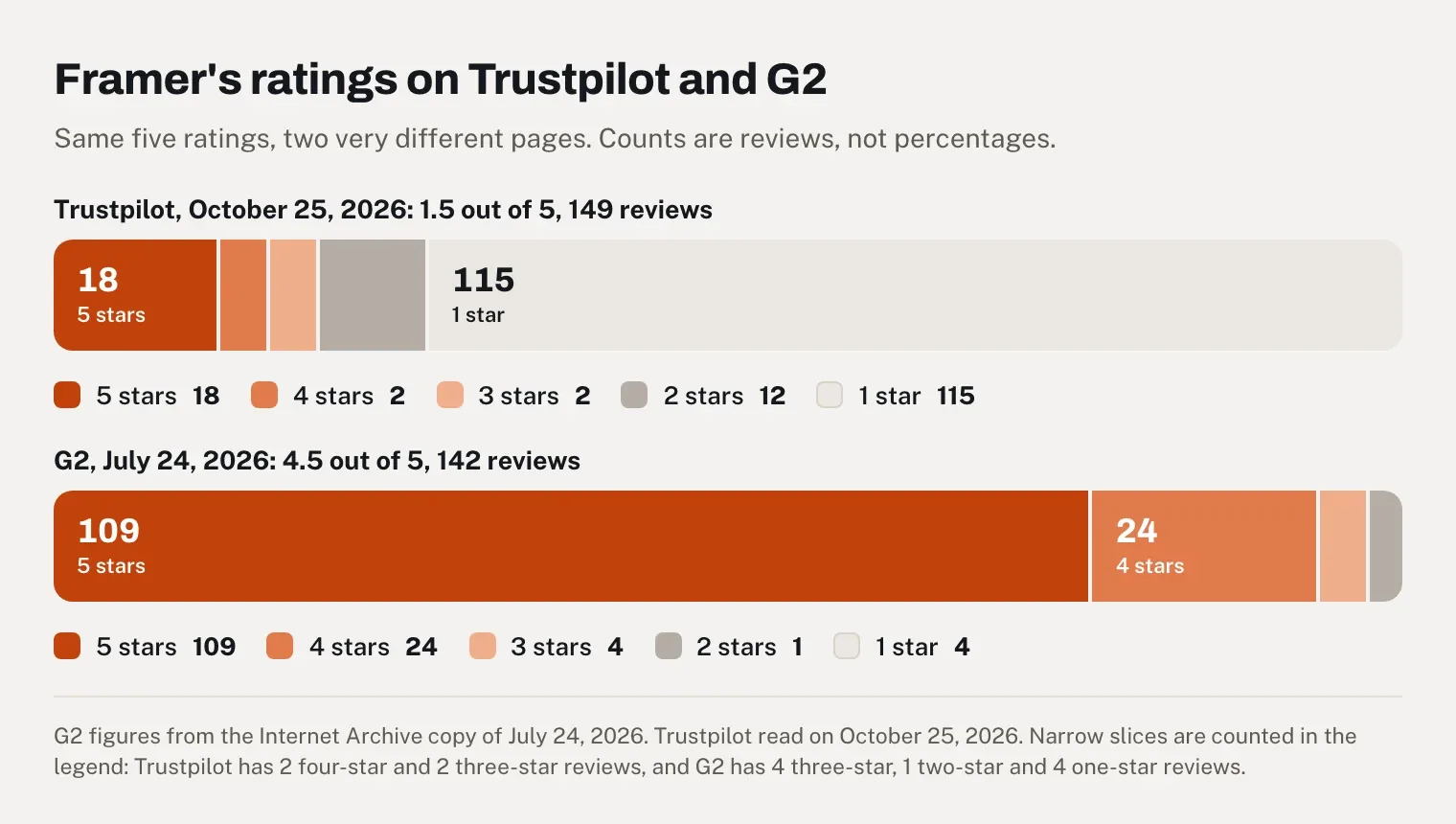
Trust: 1.5 out of 5 on Trustpilot from 149 reviews on October 25, 2026, mostly about money and support. G2 showed 4.5 out of 5 from 142 reviews on July 24, 2026, almost all written before the June changes.
Is Framer AI still available?
Yes, and it does more than it used to. Since Framer 3.0 launched on June 16, 2026, Framer AI means the agents built into the editor. They generate pages from a prompt or a screenshot, write and rewrite copy, organize the CMS, audit the site and translate it (Framer 3.0). Every plan includes them, Free too, and they run on AI credits.
The name has covered three different products, which is why the question keeps coming up. In June 2023, Framer launched Start with AI, which generated a first page from a prompt and gave it a framer.ai address. Wireframer followed in May 2025, with layouts that focus "on structure, not style." Then 3.0 added agents that keep working on the whole project after the first draft, on the model you choose (GPT, Claude Sonnet or Opus, among others). Framer's AI page now describes Framer AI as "the set of AI agents built into Framer." Some of the reviews that rank on Google, including the most-cited Reddit thread, were written before June 2026 and describe Framer before the agents.
One month on a real site: what I built and what happened
In September 2026, I built a site for a fictional B2B consultancy and kept it running until the end of the month: a home page, Services, About, Case studies, a small blog and Contact, with client testimonials. I used Basic, billed monthly, connected to my own domain. As a developer, I'd usually plan seven to ten days to design and build a site like this by hand. That was my yardstick.
Week one: a draft in half an hour, a site I'd publish by the end of the week
My prompt gave the industry, the tone, the number of sections and the language. The first home page appeared in about 50 seconds, with a header, a hero, a services section, a band of social proof, an FAQ block and a footer. Fifteen to thirty minutes later, I had a presentable version of all six pages.
The design was the strong point: generous white space, readable type, clearly separated sections, and a layout that already worked on a phone. The canvas gives you Figma-level control over every element, and that's the main reason to choose Framer over a template builder.
The first two days went to generation and the base design, and the site went live at the end of the first week. So the draft took half an hour, and turning it into a site I'd put my name on took the rest of the week. Four things needed my hands. The copy was generic, marketing lines you could paste onto many other sites. The first version had too many blocks. The visual hierarchy didn't follow what the consultancy sells first. And the overall style looked like a template. The workflow I'd recommend: let the agent propose, then delete or merge sections, fix the spacing and the grid, and polish the interactions by hand.
Weeks two to four: editing the site and filling the CMS
The rest of the month went to the work a small business does after launch: search settings, tests on phones, copy changes and new content in the CMS. Framer's AI rewrites text section by section, and you can make a passage more professional, simpler or more direct, or change its length. It's a good starting point. The brand voice still had to be rewritten by hand, headline by headline.
The CMS held the case studies and the blog posts, and the agent wrote their short descriptions and excerpts. Once the site was live, editing a page took me 5 to 10 minutes, and adding a blog post about 15 minutes with the AI's help. On phones, the generated layout was mostly clean; only the three-column grids with heavy images needed manual fixes. Two limits stood out. Multilingual sites still need work, and for a large blog built around search traffic, WordPress remains the better tool.
What the speed tests showed
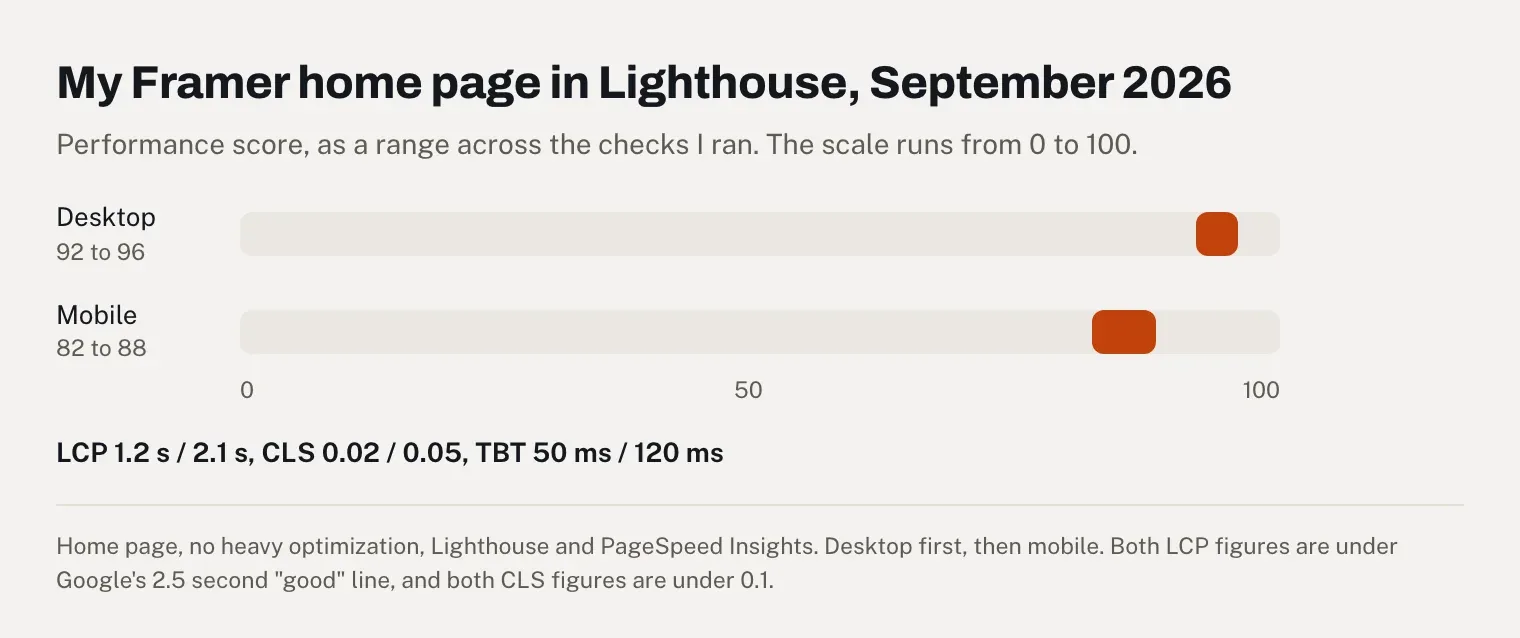
I ran Lighthouse and PageSpeed Insights on the home page several times during the month, without any heavy optimization work:
Metric | Desktop | Mobile |
|---|---|---|
Performance score | 92 to 96 | 82 to 88 |
Largest Contentful Paint | 1.2 s | 2.1 s |
Cumulative Layout Shift | 0.02 | 0.05 |
Total Blocking Time | 50 ms | 120 ms |
Both LCP and CLS sit inside Google's "good" thresholds of 2.5 seconds and 0.1 (web.dev). Add a lot of unoptimized images or heavy effects, though, and the scores drop, on Framer as anywhere else.
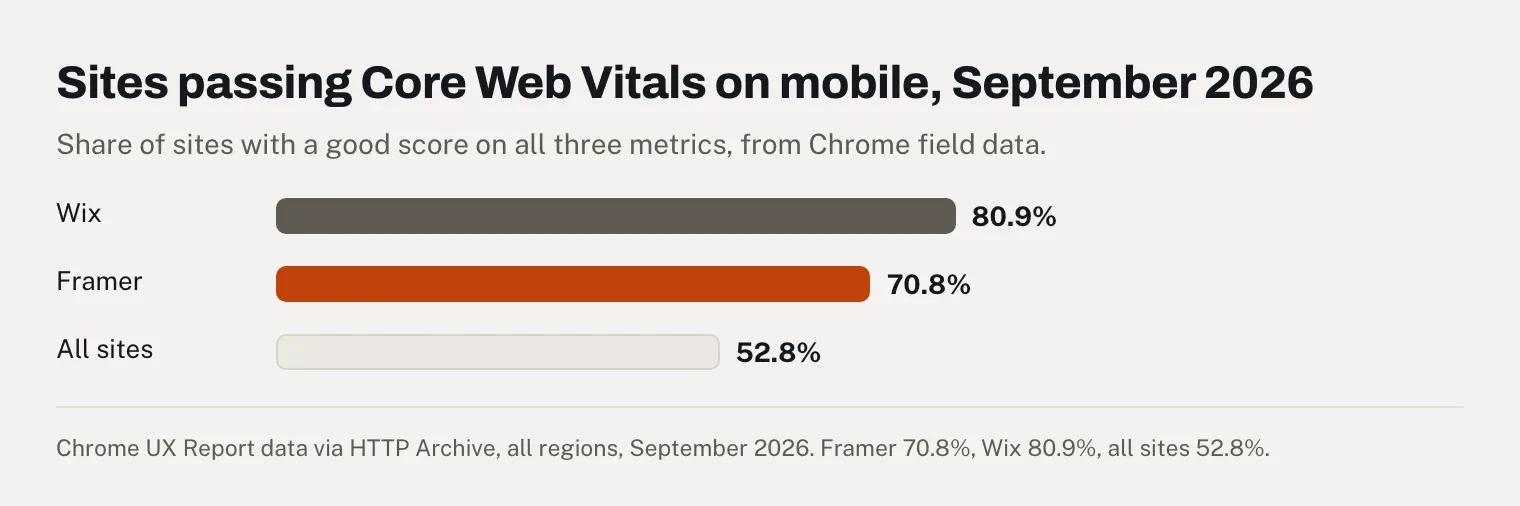
Field data across Framer sites points the same way. In September 2026, 70.8% of sites built with Framer passed Google's Core Web Vitals on mobile and 87.9% on desktop, against 52.8% and 60.8% for all sites in the same Chrome data (HTTP Archive). The weak spot is responsiveness on phones: 80.3% of Framer sites had a good Interaction to Next Paint on mobile, the lowest of the three metrics.
The credits ran out
On paper, 1,000 credits a month sounds like plenty for six pages. Framer's own estimate says otherwise: at launch, it put Basic's allowance at roughly five landing pages (AI credits post), and my site had six pages before a single rewrite. On monthly billing there's no first-month bonus either, since the "2× credits first month" on Framer's pricing page is shown for yearly billing only. Everything I asked of the agent drew on the same allowance: the pages first, then every rewrite and CMS description. I ran out before the month was over and bought 2,000 more credits for about $30.
The arithmetic favors Pro. Basic at $15 plus $30 of credits made $45, exactly what Pro costs billed monthly, and Pro would have come with the same 3,000 credits plus redirects, a staging environment, branching and 150 pages instead of 30. If you build with the agent, start the first month on Pro, then downgrade to Basic once the site is live. Framer lets you downgrade at any time, and the unused part of the plan becomes account credit for future invoices rather than a refund (downgrade help), so switch close to the renewal date. And if you already know you'll keep the site for a year, Basic billed yearly is cheaper still: $120, with a complimentary domain and 2,000 credits in the first month.
When the credits run out, Framer pauses only the features that use them. A request already running finishes, and small editor helpers such as layer renaming keep working (AI credits help).
What Framer AI costs in credits
Framer doesn't publish a price per action, because the cost of a prompt depends on the model and on how much work the agent does. Its own numbers give the order of magnitude.
On launch day, Framer cofounder Koen Bok wrote that generating a single page with GPT-5.5 "runs about $3, and a medium edit lands around $0.50." He added: "Some early testers have spent up to $300 in tokens building a complete site to the point where they were happy shipping it." And, more candidly: "If you're just tinkering on a personal site, it'll start to feel pricey fast" (Building Agents for Framer, June 16, 2026).
The price per task has fallen since. On July 21, 2026, Framer made GPT-5.6 Terra the default model and said multi-step builds now use 60 to 67% fewer credits than GPT-5.5 did at launch (Agents Efficiency). Luna, the fastest model, uses 0.4 times the credits of GPT 5.5 (GPT 5.6), and Framer recommends it for large CMS updates.
Users still describe heavy consumption after that change. In a September 2026 r/framer thread titled "Has anyone really tested Framer AI agent?", the most upvoted reply reads: "It's good but very token expensive" (Reddit). One user said the agent "spent 250 tokens or so out of my free 500" on a first portfolio page. A simple hover animation then "used all of my remaining tokens." Another found that the credits "lasted ages" one month and were "burnt through in a day" the next.
If a result misses, Framer's launch post says you can click "Mark as Bad" in the changes menu and get the credits back. The current help page on credits, updated September 30, 2026, doesn't mention it. A Reddit user wrote in September that there is "no way to get them back when the agent has wasted them on mistakes." Look for the button before you count on it.
There's a cheaper route if you already pay for Claude or Codex. Framer exposes the same agent abilities to outside agents through its @framer/agent package, and its MCP server is free during the preview. That work "spends the tokens you may have already paid for through a Claude or Codex plan," as Bok put it. The trade-off, in his words: the design updates "in big blocks instead of in real time," and you'll usually need to prompt more specifically. Several replies in the September Reddit thread recommend exactly that setup.
How much does Framer AI cost in 2026?
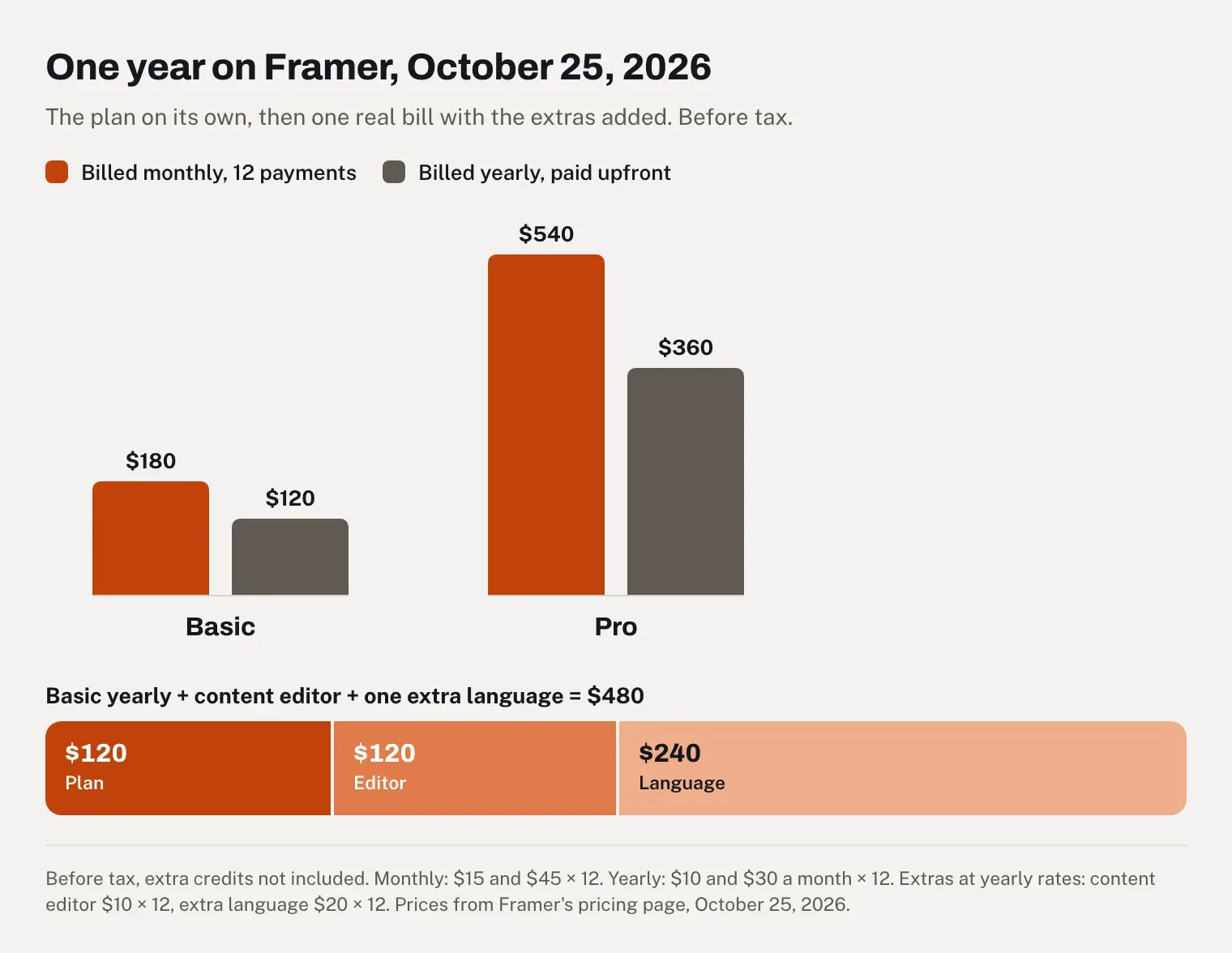
On October 25, 2026, Framer is free to start, then $10 a month for Basic or $30 for Pro billed yearly, and $15 or $45 billed monthly, before tax. A year of Basic comes to $120 paid upfront or $180 paid month by month. Editor seats, extra languages, extra credits and add-ons such as A/B testing are billed on top.
Plan | Billed monthly | Billed yearly | AI credits a month | What matters for a small site |
|---|---|---|---|---|
Free | $0 | $0 | 500 to try, if the workspace has no paid plan | A Framer address only, 1 GB of bandwidth, "ideal for non-commercial use" |
Basic | $15 | $10 a month | 1,000 | Your own domain, 30 pages, 2 CMS collections with 1,000 items, 50 GB of bandwidth, no redirects, no static files |
Pro | $45 | $30 a month | 3,000 | 150 pages, 10 CMS collections with 2,500 items, 100 GB of bandwidth, redirects, staging, branching, 50 static files |
Prices before tax, from Framer's pricing page, read on October 25, 2026. The page opens on yearly billing, and the monthly prices appear when you switch the toggle; I paid $15 a month for Basic in September 2026. Two perks exist only on yearly billing: a complimentary domain and twice the credits in the first month.
You can also raise the credits inside a plan, from 1,000 up to 15,000 a month on Basic and from 3,000 up to 100,000 on Pro. Do the arithmetic first. On the pricing page as it was shown to us (in Canadian dollars, from our office), Basic set to 3,000 credits cost slightly more than Pro, which includes the same 3,000 credits plus redirects and staging.
One year on Framer, with the extras people forget
The plan price is rarely the whole bill. Here is the plan alone over a year:
Plan | 12 months billed monthly | 1 year billed yearly |
|---|---|---|
Basic | $15 × 12 = $180 | $10 × 12 = $120 |
Pro | $45 × 12 = $540 | $30 × 12 = $360 |
Editors and translations come on top, per seat or per language, every month. At yearly rates:
Extra, billed yearly | Per month | Per year |
|---|---|---|
One extra editor | $20 | $20 × 12 = $240 |
One content editor | $10 | $10 × 12 = $120 |
One extra language | $20 | $20 × 12 = $240 |
On monthly billing, these extras cost more as well.
Take the consultancy from my test, with one person who updates the case studies and a second language for clients abroad. On Basic billed yearly, that's $120 for the plan + $120 for a content editor + $240 for the extra language = $480 a year, four times the headline price. AI translations also draw on the same credits as everything else. Our guide to what a website costs in 2026 compares that figure with what agencies and other builders charge over three years.
Seats are where the surprises come from. Framer's pricing FAQ says it will "notify you when an editor is added to your billing, and you will be charged within 24 hours." On Trustpilot, a customer in Germany wrote on July 29, 2026 that sharing a project link with someone "to view it" ended in a €147.90 charge for an editor seat, and that the refund was refused. Viewers are free, so check the role before you send any invitation.
Refunds and the credit add-on
Framer's refund policy, updated September 15, 2026, gives you 7 days after the first purchase worldwide and 14 days in the EU and Turkey (refund policy); the pricing page FAQ only mentions the EU and Turkey. Credits are stricter: usage-based add-ons "are non-refundable once any part of them has been consumed."
Extra credits come in two forms, and mixing them up causes a good share of the complaints (AI credits help). The AI Credits add-on raises your monthly allowance and renews on its own billing cycle; canceling it removes the extra credits immediately, and reducing or removing it within the same billing period generates no account credit. A one-time top-up needs an active add-on and expires at the end of the calendar month in which you buy it. So if you add credits for a build, put a reminder in your calendar to cancel the add-on once the site is done.
An August 28, 2026 Trustpilot review shows what can go wrong at checkout. A long-time customer in the Netherlands meant to buy about €90 of monthly credits, ended up with a one-time top-up of €363, and was told top-ups aren't refundable. Their advice is worth copying: "If you buy credits here, screenshot the checkout screen before you confirm."
Is Framer AI worth it?
For a design-led site of a few pages, yes, as long as you learn the canvas and budget the build month separately from the months after it. For an online store, a blog that publishes every week, a team of paid editors on a small budget, or anyone who wants to leave with the code, the same money buys more elsewhere.
My month cost $45, and Basic would have cost $15 a month after that. For a consultancy that wants a site that looks designed rather than templated, that's cheap, and the first draft spared me the blank-page phase. The catch is that the agent is the expensive part of Framer, priced for occasional use. A five-star reviewer on Trustpilot put it plainly in August 2026: Framer "would get more 5-star reviews if it weren't so damn expensive."
Your situation | Worth it? |
|---|---|
A designer's portfolio or a studio site you'll keep editing visually | Yes, on Basic billed yearly |
A startup landing page with motion and animations | Yes, on Pro if you need redirects or staging |
A consultancy or service business with 5 to 10 pages and no store | Yes, if someone on the team will learn the canvas |
An online store | No, Framer has no built-in checkout |
A weekly blog, or a site in several languages | Probably not, given the CMS limits and the per-language fee |
A team of four editors on Basic | Rarely, the seats cost more than the plan |
You want code you can host elsewhere | No |
Wix or Framer: which one should you pick?
Pick Framer if design freedom is the point and you're comfortable in a Figma-like canvas. Pick Wix if you need to sell, want the AI included in the plan price, want support around the clock, or have never used a design tool. Framer is cheaper for a basic site on your own domain, and Wix sites score better on phones in Google's field data.
Framer | Wix | |
|---|---|---|
Cheapest plan with your own domain, billed yearly | Basic: $10 × 12 = $120 | Light: $17 × 12 = $204 |
Selling online | No built-in checkout; Shopify-based plugins | From Core, $29 a month billed yearly ($348 a year) |
AI | Agents on credits, 1,000 a month on Basic | Harmony editor and its Aria agent on every plan, Free included, with no separate AI price |
Support | Paid plans: first reply within 24 hours in the app, 72 hours through the contact page | 24/7 customer care listed on every plan |
Refund window | 7 days, or 14 in the EU and Turkey | 14-day money-back guarantee on the first upgrade |
Sites passing Core Web Vitals on mobile, September 2026 | 70.8% | 80.9% |
Rating on G2, July 24, 2026 | 4.5 out of 5 from 142 reviews | 4.2 out of 5 from 1,885 reviews |
Export of a working site | No | No |
Prices before tax, read on October 25, 2026 on Framer's pricing page and Wix's plans page (US prices, yearly billing). Support from Framer's support article; Core Web Vitals from HTTP Archive for September 2026; G2 ratings from the Internet Archive's copy of Framer's G2 page.
Wix covers more ground. Its Light plan can't take payments (Wix help), but Core can, with a store and appointment scheduling built in. Framer has no commerce of its own: in its help center, Framer states that it "does not process payments or handle transactions" even for templates sold in its own Community (Framer help). Sites that sell can run a Shopify store through a marketplace plugin such as Framer Commerce. Wix's AI comes with the plan, too, since the Harmony editor and Aria are included "in every Wix plan, including the free forever plan" (Wix). And Wix sites respond better on phones: 92.6% had a good Interaction to Next Paint on mobile in September 2026, against 80.3% for Framer sites.
Framer wins on design. Its canvas works like Figma's, so a designer gets exact control over layout and motion, and an r/framer user who builds in both Framer and Webflow summed up the learning curve in 2024: "if you know Figma it's very easy to pick up." For someone who has never used a design tool, that same canvas is the hard part. A French reviewer on Trustpilot called Framer a "horrible experience for a non-experienced user" in August 2026.
Neither one lets you take a working site elsewhere. Wix says a site "needs to be hosted and operated on Wix's servers" (Wix help), and Framer's position is covered in the FAQ below. My advice: a beginner who wants to sell or take bookings should start with Wix, and a designer who wants the live site to match the mockup should start with Framer.
What Google sees on a Framer site
Framer renders and pre-renders pages on its own servers (Framer help), so the text is already in the HTML a crawler receives. Our own check confirmed it, with two weak spots.
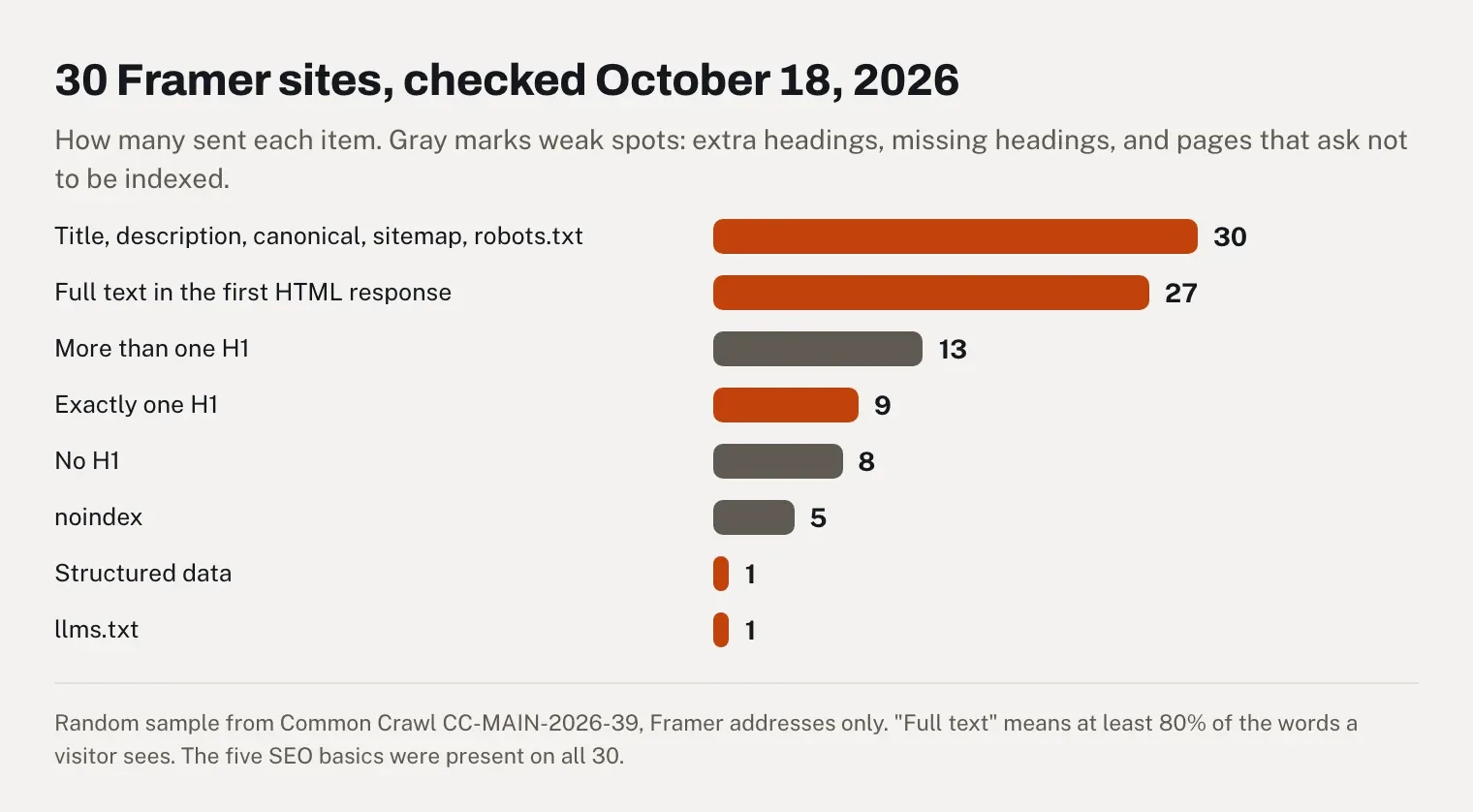
On October 18, 2026, we checked a random sample of 30 Framer sites drawn from Common Crawl's September 2026 index (CC-MAIN-2026-39). All 30 used Framer addresses (20 on framer.website, 6 on framer.ai and 4 on framer.app), so none had a custom domain. Here's what came back:
28 sites had text, and 27 of them sent all of it in the first HTML response ("all" meaning at least 80% of the words a visitor sees).
All 30 had a title, a meta description, a canonical URL, a sitemap and a robots.txt file.
Structured data appeared on 1 site, and an llms.txt file on 1.
5 carried a noindex directive, which asks search engines to leave the page out.
In the raw HTML, 9 home pages had exactly one H1, 8 had none and 13 had more than one.
The H1 count has a likely explanation. When we examined five Framer templates in October 2026, Framer often wrote one version of a section per breakpoint and hid the ones that didn't apply, so a heading could appear two or three times in the HTML. If you want a single H1 per page, check the published HTML rather than the canvas. The pages are also heavy, at a median of 345 KB of HTML per home page and up to 2.4 MB.
The plan matters for search too. Basic has no redirects, so if you move an existing site to Framer and your URLs change, you can't point the old addresses to the new ones without Pro. Our guide to redesigning a site without losing your rankings explains why that matters. Basic also can't host static files, such as a .well-known file or the key file IndexNow asks you to upload. A user in India complained on Trustpilot in July 2026 about being "not able to edit robots.txt or upload any static file for index now" without upgrading. Our guide to SEO for AI-generated websites covers what else to check once the site is live.
What changed in 2026, and which claims are out of date
Framer changed its plans on June 16, 2026, and several reviews that rank on Google haven't caught up. These claims no longer match Framer's own pages:
What some ranking reviews say | What Framer's pages say on October 25, 2026 |
|---|---|
Basic caps you at 10,000 visitors a month | No visitor cap is listed; Basic includes 50 GB of bandwidth, and you can exceed it for one month (pricing) |
Pro costs $20 a month | $30 billed yearly, $45 billed monthly |
There's a Mini or a Scale plan | Two paid plans, Basic and Pro; Scale was retired on June 16, 2026 (AI credits post) |
An editor seat costs $40 a month | $20 since June 16, 2026, or $10 for a content editor |
Framer 3.0 came out in July 2026 | June 16, 2026 (Framer 3.0) |
Free gives 500 AI credits a day | The June launch post said daily; the pricing page and help center now say 500 credits "to try" for workspaces without a paid plan |
Support is forum-only | Paid plans get Product Experts, with a first reply within 24 hours in the app (support) |
There's no localization | A translation add-on covers up to 20 languages |
Two complaints from older reviews still hold: there's no built-in store, and the site can't leave Framer as working code. One more has aged out. The 2024 Reddit remark that "the cheapest plan is only for one landing page" described the old Mini plan, and Basic now allows 30 pages and two CMS collections.
Framer AI reviews on Reddit: what users say about the agent
On Reddit, opinions of the agent are mixed. In the September 2026 thread quoted earlier, people praise the output and complain about the cost in the same breath. "Very token heavy and doesn't follow instructions as well," wrote one user, who now uses Claude Code instead. Another said the agent "helped me a lot but also broke some functionalities of my portfolio," and a third that it would "create more problems when i just needed a simple fix." A fourth asked for a gradient background saved as a style, and the agent "explored 500+ layers" and changed fills and corner radii on other layers, "none of which I asked for." On the other side, one user called it "the greatest AI agent for design," and another, who sketches in Figma and hands Framer a screenshot, wrote: "It's worth it to me. Saves me a massive amount of time."
The thread that ranks for "honest review of Framer from a developer's perspective" is much older. It was posted in March 2024, and when another user pointed out that its author had spent "less than a day with the tool," he replied: "Perhaps I should change the title from 'review' to 'first impressions'" (Reddit). It predates the agents by more than two years.
Framer on Trustpilot and G2: why the ratings are so far apart
Framer scores 1.5 out of 5 on Trustpilot and 4.5 on G2, and the two pages mostly hear from different people at different times. G2's reviews come from verified professionals, almost all of them written before the June 2026 changes. Most Trustpilot reviews since June come from customers with a billing or support problem.
On October 25, 2026, Framer's Trustpilot page showed 1.5 out of 5 from 149 reviews, 115 of them one-star and 18 five-star (Trustpilot). The page is getting busier: 10 reviews before 2024, 17 in 2024, 54 in 2025 and 68 so far in 2026. Since Framer 3.0 on June 16, 41 reviews have come in, 36 of them with one star, and Framer had replied to 3 reviews in total. Most of these recent reviews are about money and support rather than the editor itself.
I grouped the 41 reviews posted since June 16 by complaint. It's my own count, and some reviews raise more than one:
Credits and billing, about 25 reviews. On October 6, 2026, a UK reviewer wrote that getting the agent to "make the most basic changes (remove an image, and add a table for example) will cost you hundreds of credits." On October 16, a customer in Sri Lanka who lost a legacy plan described the new Basic as capping the site "at 30 pages" and Pro as "$45/mo, 2.25x for the same site."
Support handled by bots, about 12. "Nonexistent customer service ('Sam' the AI needs to be fired)," a US reviewer wrote on October 7. On October 13, a user in Denmark said there was no way to reach the team, days after trying the critical support line.
The agent's mistakes, paid for in credits, about 8. A Belgian reviewer suspected that "you keep buying credits to fix things that are induced by the software itself" (July 16).
Seat charges, 3. The €147.90 editor seat quoted in the pricing section is one of them.
G2 tells the opposite story. The site blocks automated visits, so the latest copy of Framer's G2 page we could read is the one the Internet Archive saved on July 24, 2026. It showed 4.5 out of 5 from 142 reviews, 109 of them five-star and 4 one-star. G2 approves a review only if the reviewer has connected a LinkedIn profile or a work email address (G2 documentation), and 96 of Framer's reviewers work at companies with 50 employees or fewer. Nine of the ten reviews on the first page came in without an invitation, and two carry G2's "Incentivized" label, used when a small reward such as a gift card was offered (G2 guidelines).
The G2 score also moves slowly. The page had 137 reviews in January 2026 and 142 in July, so it rests almost entirely on reviews written before the agents and the June 16 plans. None of the ten reviews on its first page was posted after Framer 3.0, and none mentions AI credits.
Even so, the complaints on G2 point the same way as my month on Framer, only more gently. In G2's own tally of pros and cons, "Expensive" gets 8 mentions and "Pricing Issues" 7, behind "Missing Features" at 10. A chief marketing officer wrote on June 9, 2026 that "Framer's pricing seems to scale quite quickly and is somewhat unclear." In May 2026, a web designer and developer at a small business found the AI features "good for first drafts," but said they "often produce generic layouts that don't match a brand." The same review notes that "exporting a site out of Framer isn't really possible." In September 2025, a digital lead at a mid-sized company listed multilingual sites as the only pain point: "it's not possible to translate URLs," and the price of several languages "becomes quite noticeable."
Customer support is where the two pages disagree most. It's the second most praised point in G2's tally, with 23 mentions, and a principal designer wrote in September 2025 that the support team is "so nice, helpful, and quick to respond." On Trustpilot since June, support handled by a bot is the second most common complaint. Framer also answers on G2: six of the ten reviews on the first page have a reply from someone at Framer, against 3 replies in total on Trustpilot.
Framer AI review: pros and cons
What Framer does well:
The first draft is fast: a home page in about 50 seconds and six presentable pages within half an hour in my test.
The design control is close to Figma's, and the generated layouts worked on phones from the start.
Pages load quickly: my home page scored 92 to 96 on desktop and 82 to 88 on mobile, and 70.8% of Framer sites pass Core Web Vitals on mobile, against 52.8% of all sites.
Search basics are on by default: every site in our sample had a title, a description, a canonical URL and a sitemap, with the text in the HTML.
Basic is cheap for a design-led site, at $120 a year with your own domain.
Professionals who use it at work rate it highly: 4.5 out of 5 from 142 G2 reviews in July 2026, with ease of use the most praised point.
Where it falls short:
Credits run out during a build, and extra ones cost me about $15 per 1,000.
The agent can change things you didn't ask for, and the "Mark as Bad" refund isn't mentioned in the current help page on credits.
Editor seats are charged within 24 hours of being added, and several reviewers say they were billed by surprise.
There's no working export of the site, and Framer's two help articles on the subject contradict each other.
Basic has no redirects or static files, and stops at 30 pages.
On non-Enterprise plans, Framer's AI Notice (September 18, 2026) lets it train its own models on your prompts and the agent's output, unless AI training is turned off in your workspace settings.
Who should use Framer AI, and who should look elsewhere
Framer fits designers and small studios who want a site that looks exactly like what they had in mind, and startups that need a landing page with motion. It also works for service businesses with five to ten pages, as long as someone is willing to learn the canvas. Teams who already pay for Claude or Codex can drive it through external agents and keep their Framer credits for the canvas.
Look elsewhere if you sell online (Wix or Shopify) or run a large blog (WordPress). The same goes if you'd rather describe your business and get a finished site without designing it. If what you want is code you can host anywhere, an AI app builder fits better. Our reviews of Lovable, Base44, Bolt.new and Replit Agent cover four of them, and our Lovable alternatives test compares how locked in each one leaves you.
Where Eqlo fits, if you'd rather describe your business than design pages
This is my product, so read this section as such. Eqlo is an AI website builder that starts from one sentence about your business, writes the pages and the copy, prices included, then publishes the site with its own admin. For a consultancy like the one in my test, the small business website builder shows what Eqlo writes for consultants, coaches, therapists and trades; for a designer's work, there's the portfolio website builder. If you like the look of an existing site, importing from a URL picks up its background, accent colors, fonts and corners, never its copy or images.
Every page is checked before it goes live, a single H1 included, and the full HTML is there on the first load. A shop with Stripe and online bookings come with every plan, Eqlo takes no commission on sales, and every plan, Free included, can send a complete Next.js project to your GitHub. You choose where each project is hosted: the European Union, the United States or the United Kingdom (data residency).
On October 25, 2026, Free costs $0 for five projects on an eqlo.dev address with $3 of AI a month, and Plus costs $19 a month with your own domain and $30 of AI (Eqlo pricing). Visitors aren't counted, and layout tweaks and text edited in the preview don't touch the AI budget. If the budget runs out, only AI requests wait for the 1st of the month while the sites stay online. If designing every pixel on a canvas is what you enjoy, Framer remains the better fit.
Comparison established on October 25, 2026 from public offers. If you spot an error, write to hello@eqlo.app.
Frequently asked questions
Is Framer AI free?
You can try it for free. Workspaces with no paid plan get 500 AI credits, which Framer's launch post equated to about two landing pages, and the site lives on a Framer address. Framer calls the Free plan "ideal for non-commercial use," and connecting your own domain takes Basic or Pro.
How much does Framer AI cost per month?
Basic costs $10 a month billed yearly or $15 billed monthly, and Pro costs $30 or $45, before tax, with 1,000 and 3,000 AI credits a month. Extra credits come as an add-on starting at 1,000 credits; I paid about $30 for 2,000 on Basic in September 2026. At yearly rates, each extra editor adds $20 a month, and so does each extra language.
Can you export a Framer site?
Not as a working site, according to Framer's help article on the subject: "Framer does not offer HTML export for self-hosting" (Framer help). A second article, written for the EU Data Act, says every site is published as standard HTML and that "you can download these files at any time" (porting your data), without saying how. Both were updated on September 15, 2026. CMS content does leave cleanly, as CSV or JSON through plugins. Our glossary explains what a full repository export should contain.
Is Framer good for SEO?
For the basics, it is. Pages are rendered on Framer's servers, and every site in our 30-site sample had a title, a description, a canonical URL and a sitemap. Watch for two things: headings duplicated in the HTML, and the lack of redirects on Basic if you're moving an existing site. Once you publish, run your key pages through our free indexability check to see the title and H1 Google reads.
What do Reddit users say about Framer AI?
Mostly that the agent is good and expensive. In a September 2026 r/framer thread, the top reply called it "very token expensive," several users recommended driving Framer from Claude Code instead, and others said it saves them a lot of time on the tricky parts. The often-cited "honest review" thread dates from March 2024, two years before the agents existed.
My verdict
Framer AI does what the demos show in the first hour, and my month showed where the money goes afterward. The agent behaves like a fast junior designer billed by the task: excellent for a first draft or a layout you can't crack, expensive as a way to make every small edit. So plan two budgets. Build on Pro for a month, or on Basic billed yearly with its doubled first-month credits, then keep the site on Basic and make the small changes by hand. If you need to sell, run a busy blog, want your code or have no wish to learn a design tool, Wix or another tool will give you more for the same money.
Sources: Framer's pricing page, help center (AI credits, refund policy, downgrades, support, export and data porting), AI Notice, blog posts of June 16, 2026 and product updates from June 2023 to July 2026, read on October 25, 2026; Wix's plans page, help center and Harmony pricing post, read the same day; my own month on Framer in September 2026; HTTP Archive's Core Web Vitals data for September 2026; r/framer threads from March 2024 and September 2026; Framer's Trustpilot page on October 25, 2026; Framer's G2 page in the Internet Archive's copies of January 29 and July 24, 2026, with G2's community guidelines and review documentation; our check of 30 Framer sites on October 18, 2026. If you spot an error, write to hello@eqlo.app and we'll correct it.