

Bolt.new Reviews: Seven Days on a Real Client Project, From Prompt to Production
We built a booking app for a yoga studio in Lyon with Bolt.new, from first prompt to live Stripe payments in seven days. Tokens per phase, code quality, plan costs and who Bolt fits.

By David RieuFounder of Eqlo

Most Bolt.new reviews you'll find test a to-do app over an afternoon, and you're trying to decide whether Bolt can carry a paid project to launch day. This Bolt.new review follows one: a booking app for a yoga studio in Lyon, built over seven days in September 2026 and shipped to production with live Stripe payments. Short version: Bolt got us from a prompt to a working full-stack app faster than any hand-coded workflow, and it still needed a developer reading the payment logic, plus a day or two of refactoring afterward.
Before you go further: I founded Eqlo, which competes with Bolt.new in part. I keep Eqlo to one clearly marked section near the end, and every claim about Bolt links to its own documentation or pricing page.
Quick verdict
Best for: MVPs, simple B2B apps, early-stage startups and internal tools, when someone on the team can read code.
Skip if: the first version is already a complex, critical application, or you need a custom architecture from day one, or nobody will review security and payments before launch.
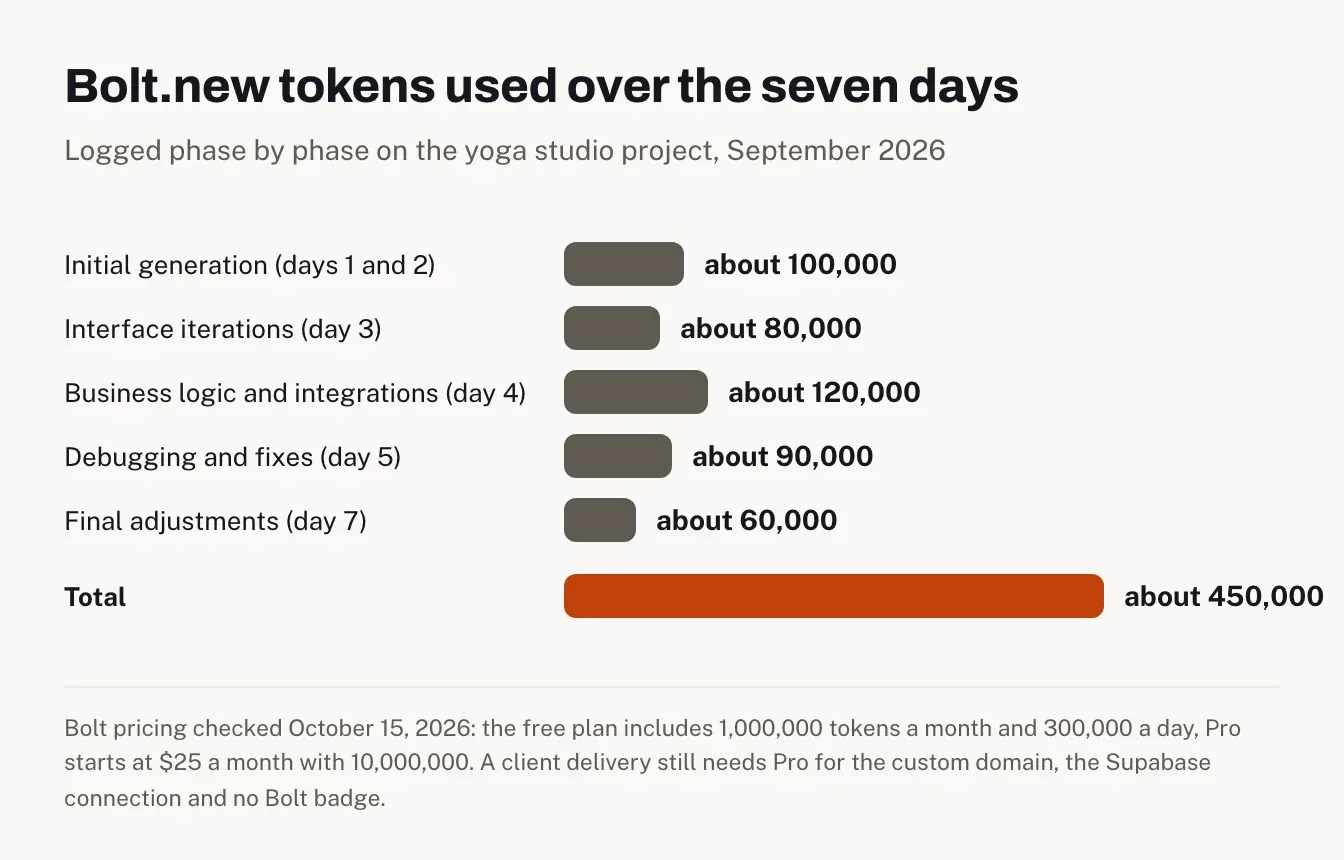
What our week cost in tokens: about 450,000 tokens from first prompt to final fixes, logged phase by phase below.
Price on October 15, 2026: free plan with 1M tokens a month, Pro from $25 a month for 10M tokens, Teams at $30 per member per month.
Is Bolt.new a good AI app builder?
Yes, for getting a real app off the ground. In our test, Bolt generated a working Next.js app with a database schema in under five minutes, and we shipped a paying client's booking system in seven days. It's weaker on business rules, server-side validation and long-term code structure, which still need a developer.
The project: a booking app for a yoga studio in Lyon
The client runs a yoga studio in Lyon and wanted to stop managing bookings by hand. The brief was a classic small B2B app:
Three roles: studio admin, teacher, client.
Key pages: home, class schedule, class and teacher pages, client area (bookings, memberships), and a light back office for classes, teachers and bookings.
Must-haves: Stripe payments, monthly and quarterly memberships, sign-up and login, booking cancellation.
Stack we asked for: full-stack Next.js, Tailwind CSS and a Supabase database.
That's a useful test because it mixes the part AI builders are good at (screens, forms, layout) with the part where they tend to slip (payments, capacity rules, permissions).
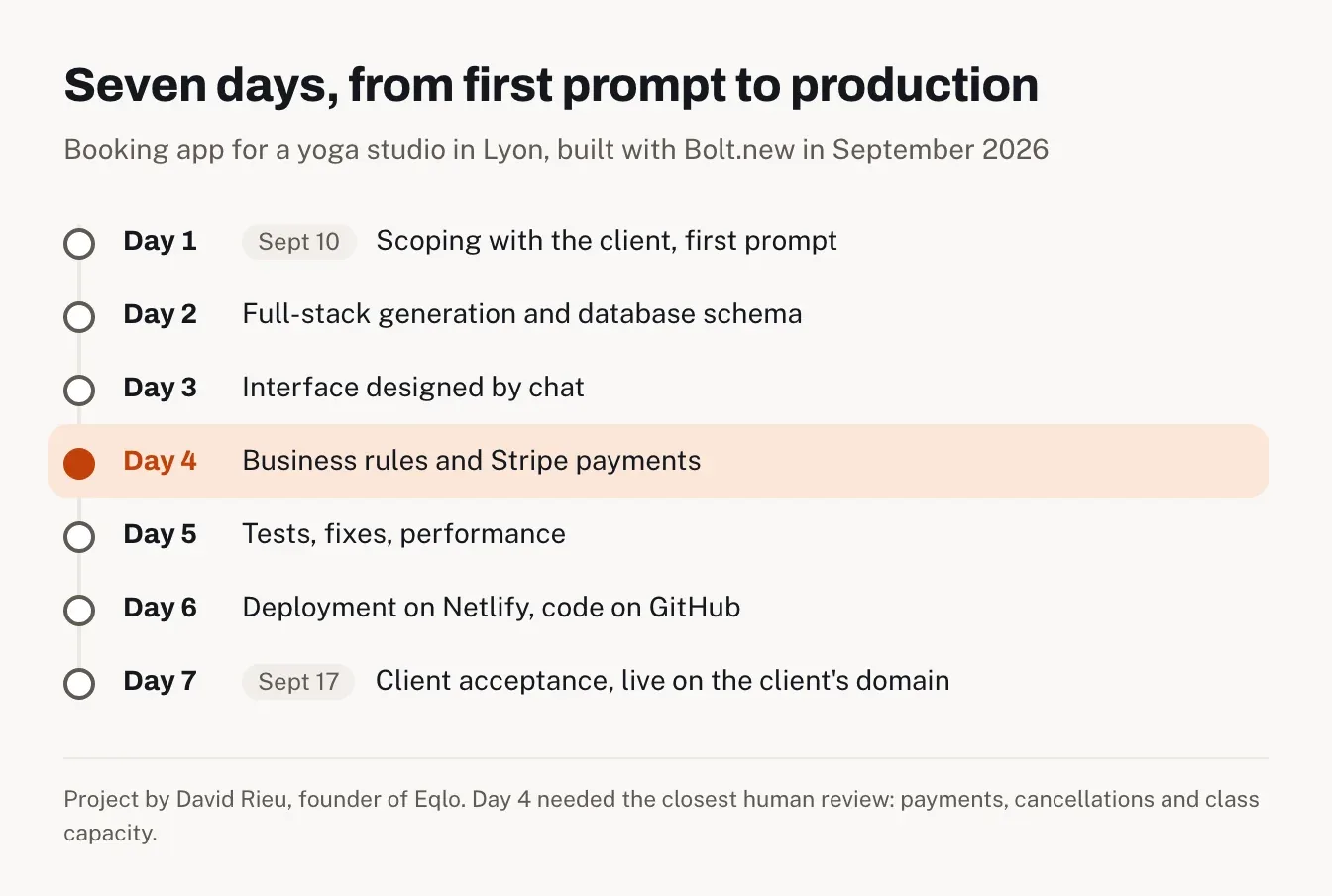
Seven days, from first prompt to production
Day 1: scoping before touching Bolt
The kickoff with the client happened on September 10. We spent the first half-day on roles, pages, payment rules and cancellation rules before opening Bolt, and I'd do that again on any project. Bolt can't guess that a late cancellation forfeits the class unless you tell it.
Then the first prompt. We wrote it in French (Bolt handles French prompts fine), and here's the translation:
> "I want to build a booking app for a yoga studio in Lyon. Clients can sign up, book classes from a weekly schedule, pay with Stripe and manage memberships. The back office lets staff manage classes and teachers and see bookings. Stack: full-stack Next.js, Tailwind CSS, Supabase. Responsive, mobile-first design, nature and pastel color palette."
We deliberately kept the first scope small. Big, vague prompts are where tokens disappear.
Day 2: a full-stack app in under five minutes
This is the moment that sells Bolt. The first prompt produced Next.js pages in the app/ folder, API routes, React components, Tailwind configuration and an initial database schema, all in under five minutes. It runs inside the browser on StackBlitz's WebContainers technology, so there was nothing to install locally, and npm packages like stripe or @supabase/supabase-js went in from the interface.
The schema covered users, classes, bookings, memberships and payments. Follow-up prompts added a class level (beginner, intermediate, advanced), a maximum capacity and a more detailed payment status. Two things went on the to-fix list. Table names came out in English by default ("bookings", "courses") and had to be reworded to match the client's vocabulary. And relations were sometimes thin: no ON DELETE constraints in places, shallow joins.
Day 3: designing the interface by chat
No Figma file. We steered the design entirely through prompts and small edits in the code view, which is what people mean by vibe coding. One real example:
> "Make the schedule page easier to read. Switch to a weekly calendar view. Add a filter by teacher and a count of remaining spots."
Bolt rewrote the schedule component, added the teacher selector and the spots counter, and the result looked good. Here's the catch we saw all week: Bolt tends to rewrite whole components for small requests. What should have been a 10-line addition came back as 200 rewritten lines. It works, but every rewrite adds technical debt you'll pay for later.
Day 4: business logic and Stripe, the real test
Day 4 is where an AI builder earns its keep or doesn't, and it's where we spent the most attention.
The Stripe part went through prompts: Checkout sessions, webhooks for successful, failed and refunded payments, and the link between payment status and booking status in the database. API keys and secrets went into Bolt's environment settings. Bolt's Stripe documentation now says it "automatically handles webhook endpoint registration and signature verification." We still read that code line by line before going live, because a payment bug on a client project is the one bug you can't shrug off.
Then the studio's rules:
Late cancellation (less than 24 hours before class): Bolt turned the rule into a condition in the API route once we spelled it out. Without a precise prompt, it simply didn't exist.
Full class: Bolt generated a capacity check before inserting a booking, but the server-side validation was sometimes incomplete.
Waiting list: it needed its own prompt and several rounds before the result was clean.
The pattern is consistent. Bolt writes what you describe, and it doesn't infer business context you didn't give it. Protecting endpoints behind authentication and checking permissions stayed a human job. Since late July 2026, Bolt also offers a security audit from the Publish menu, which on paid plans doesn't use tokens. On a project like this I'd run it, then still review payments and permissions by hand.
Day 5: tests, fixes and the token meter
Bolt shows server logs and Next.js build errors right in the browser, and asking it to fix things works more often than not. A prompt like "Debug this 500 error on /api/bookings" usually came back with a relevant fix.
We tested every user flow on mobile, tablet and desktop. Performance wasn't production-ready at this stage, so we added pagination to the schedule, cut down N+1 queries and started caching semi-static data. Bolt's skills helped apply performance and SEO conventions across the project.
Watch the meter on this day. Every debug prompt costs tokens, and regenerating a whole component costs a lot more. Bolt's own pricing FAQ explains why: "most token usage is related to syncing your project's file system to the AI: the larger the project, the more tokens used per message." Restoring an earlier version from version history, on the other hand, costs nothing.
Day 6: deployment on Netlify
Bolt publishes to its own hosting by default, on a free bolt.host address, and it still supports Netlify as an alternative. We used Netlify, with these settings:
environment variables for the Stripe keys (publishable and secret), the Supabase URL, the webhook secret and the authentication key;
build command npm run build, output directory .next;
a temporary subdomain for staging, and the client's domain for production.
We pushed the code to GitHub halfway through the project, not at the end. Bolt's GitHub integration syncs commits automatically, and having the repo early secured the code and opened the door to a normal CI setup.
Day 7: client acceptance and go-live
On September 17, we ran acceptance with the client on a video call, live:
Create a client account.
Log in and view the schedule.
Book a beginner yoga class.
Pay with Stripe in test mode.
Receive the confirmation email.
Cancel the booking.
Check the membership status in the profile.
The client's last-minute requests were small: new wording on the home page, the class level shown directly on the class page, and no time slots on Sundays. We made those through quick prompts or by editing the code directly. Then production: the client's own domain, automatic SSL through Netlify, and environment variables switched to Stripe live keys. The site went live that day.
What did Bolt.new cost? Tokens and plans
Here's the token log for the week, phase by phase:
Phase | Tokens used |
|---|---|
Initial full-stack generation (days 1 and 2) | about 100,000 |
Design and interface iterations (day 3) | about 80,000 |
Business logic and integrations (day 4) | about 120,000 |
Debugging and fixes (day 5) | about 90,000 |
Final adjustments (day 7) | about 60,000 |
Total | about 450,000 |
Tokens are what most user reviews complain about, so they were the first thing we tracked. In our case, they weren't the budget problem. Keeping each prompt to one feature kept us far below the multi-million-token debugging stories you'll read on Reddit. On paper, 450,000 tokens even fits inside the free plan's 1 million a month, with no single day near its 300,000 daily cap.
The plan you need for a client delivery is a different question. On the free plan, custom domains aren't available, published sites carry a "Made in Bolt" badge, and connecting Supabase is reserved for Pro and Teams according to Bolt's Supabase documentation. For a paid project with the client's domain and a Supabase database, Pro is the realistic floor.
Plans on Bolt's pricing page, checked October 15, 2026:
Plan | Price | Tokens | What it adds |
|---|---|---|---|
Free | $0 | 1M a month, 300K a day | hosting on bolt.host, Bolt branding |
Pro | from $25 a month | from 10M a month, no daily limit | custom domain, no branding, unused tokens roll over one month, SEO boosting, choice of database provider |
Teams | $30 per member a month | per member | centralized billing, team access management |
Higher Pro tiers add more tokens, for example $50 or $100 a month. Bolt's billing help says yearly billing comes at a 10% discount. Hosting on Netlify and the Supabase database bill separately from Bolt.
The code after seven days
The code is readable, and that matters more than any feature list. Bolt used standard tools (Next.js, React, Tailwind CSS) and a familiar layout: app/ for pages and layouts, components/, API routes, lib/ for Supabase and Stripe helpers, plus the usual next.config.js, package.json and .env. Any experienced developer can open it, and per Bolt's terms summary, "all code that you create with Bolt and StackBlitz is your own code."
What we found after a week of rewrites:
business logic mixed into presentation components, such as booking validation inside a UI component instead of a separate service;
components that grew heavy after several rounds of rewriting;
almost no generated unit tests;
duplicated code between similar pages.
Past five or six screens, the code got noticeably harder to maintain. I'd budget one to two days of refactoring after delivery to move business logic into services, add tests and even out the style before adding features.
Compared with a hand-coded build by an experienced developer, scoping took the same half-day, and the full-stack scaffolding took one day with Bolt against three to five by hand. Stripe and Supabase took about the same time either way, since a human has to review them regardless. Some of the time saved on scaffolding came back as debugging and prompt rewording. The bigger shift is the job itself: you steer an agent more than you type code, which rewards architecture skills over raw programming.
What most Bolt.new reviews miss: search engines
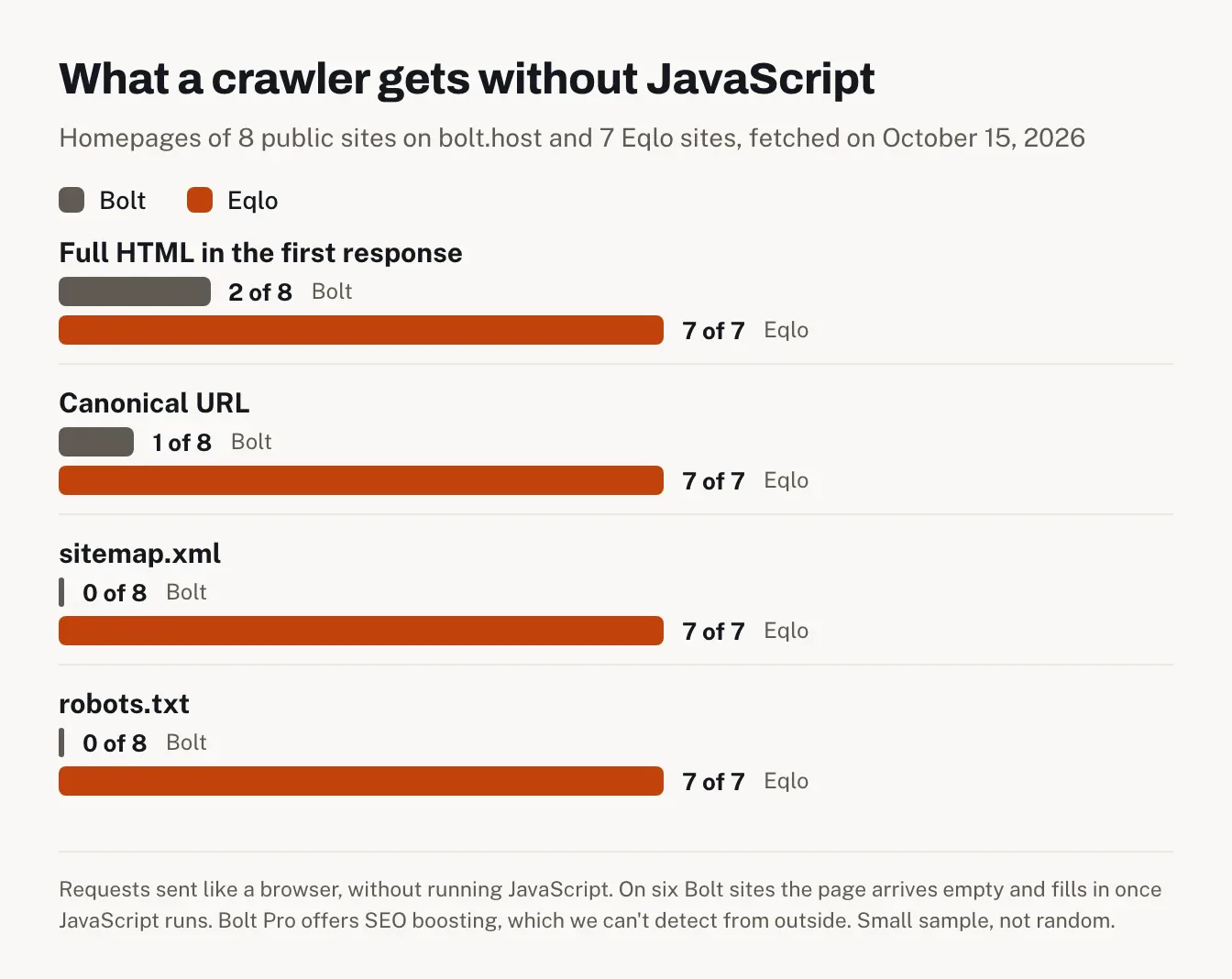
Our client project was an app behind a login, so search didn't matter much. For a public website, it does, and none of the top-ranking reviews we read check it. On October 15, 2026, we fetched the homepages of eight public sites published on bolt.host (studios, gyms, a retreat, a booking tool) and seven sites published on Eqlo, the way a browser does without running JavaScript.
Homepage check | Bolt, 8 sites | Eqlo, 7 sites |
|---|---|---|
Full HTML in the first response | 2 | 7 |
Meta description | 4 | 7 |
Canonical URL | 1 | 7 |
sitemap.xml | 0 | 7 |
robots.txt | 0 | 7 |
Structured data | 1 | 2 |
Six of the eight Bolt sites sent an empty page shell, the content arriving only once JavaScript runs. That's normal for a client-side rendered app, and Google does run JavaScript, more slowly. Requests for sitemap.xml or robots.txt on these sites returned the app's HTML page instead of a real file.
Bolt has an answer on paid plans. Its Pro plan lists SEO boosting, a form of pre-rendering that, in Bolt's words, "creates a ready-to-go HTML version of each page ahead of time" for search engines. We can't tell from outside whether a given site uses it, so read the table as what Bolt sites look like by default, from a small and non-random sample. To see what Google reads on your own pages, use our free index check tool, and our page on SEO for AI-generated websites covers the fixes.
Bolt.new review: pros and cons
What Bolt.new does well
Speed to a working app: a full-stack Next.js project with a schema in under five minutes.
A complete development environment in the browser, with nothing to install.
Switching between prompts and direct code edits gives you real control over the result.
Code in standard frameworks that you own, with GitHub sync.
Useful safety nets: version history that costs no tokens, Plan Mode before building, and a security audit on paid plans.
Where it falls short on a real project
It doesn't infer business rules. Late cancellations, capacity and waiting lists only exist if you specify them precisely.
Small requests often trigger whole-component rewrites, which inflate tokens and technical debt.
The code needs refactoring before it's maintainable past a prototype.
A client delivery effectively requires Pro, for the custom domain, the Supabase connection and removing the badge.
Who should use Bolt.new, and who shouldn't
Bolt.new is a strong choice for MVPs, simple B2B projects, early-stage startups and internal tools. If your team includes someone who can review code, it'll get you to a usable first version in days rather than weeks. Our page on building a SaaS MVP covers that path in more detail.
It's a weaker fit for critical, complex applications from the very first version, and for projects that need a custom architecture from the start. And if nobody on the project reads code, the business rules and security checks that Bolt doesn't infer become a real risk on launch day.
My advice if you're still unsure: run Bolt on a small real project of three to seven days. Write the business rules before the first prompt, push to GitHub early, keep one feature per prompt, and read the payment code yourself.
Bolt.new vs Eqlo for a booking website
This is our product, so weigh this section accordingly. We didn't build the studio's app in Eqlo, so there's no side-by-side result here, only what Eqlo does for the same kind of business.
Eqlo builds a website or a mobile app from a sentence, hosts it and gives every site its own admin (the full list is on the features page). It's aimed at people who don't want to manage code, where Bolt suits teams that do. For a studio, salon or practice, that means:
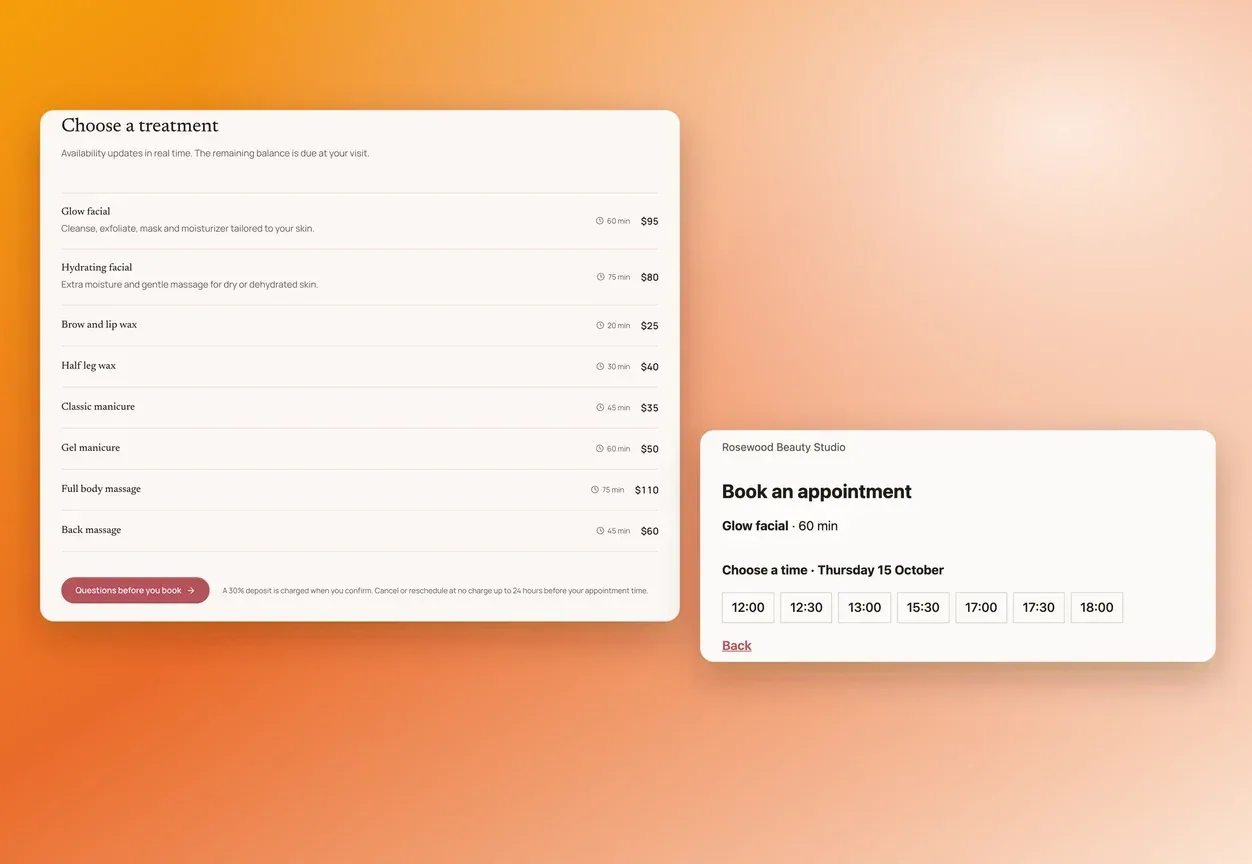
Bookings built in: services with duration and price, opening hours, slots from 5 to 240 minutes, an optional Stripe deposit, and email reminders (or SMS with Twilio). See our booking website builder.
Memberships: member accounts, and premium access sold as a monthly or yearly subscription on the owner's own Stripe account, with no Eqlo commission.
Pages search engines can read on day one: full HTML, titles, descriptions and a sitemap on every page, with checks that block publishing when a page lacks an H1 or has a broken link.
An admin for every site: bookings, requests and analytics that don't use cookies.
The code: a full Next.js project exported to GitHub on every plan, for developers who want to take over.
Eqlo is free for five projects on an eqlo.dev address, then $19 a month for your own domain, with a monthly AI budget instead of tokens. Details are on the pricing page. If you build sites for clients, our page for agencies explains client workspaces and repository handover.
FAQ
Is Bolt.new a legit website?
Yes. Bolt.new is made by StackBlitz, the company behind the WebContainers technology that runs a development environment in the browser. You own the code you create with it and can use it commercially, according to Bolt's help center.
Can you deliver a client project on Bolt's free plan?
Not realistically. Our week used about 450,000 tokens, which fits the free plan on paper, but the free plan doesn't allow custom domains, adds a "Made in Bolt" badge and doesn't let you connect Supabase. A paid client project needs Pro, from $25 a month.
Does Bolt.new work with prompts in other languages?
It does. We wrote every prompt in French and the generated code followed the instructions. Bolt still defaults to English names for tables and variables, so ask for your own naming if it matters to the client.
Is Bolt's code good enough for online payments in production?
Partly. Bolt generates the Stripe routes and handles webhook signatures, but business rules, permissions and validation still need a developer's review before you switch to live keys. In our project, that review is what made going live on day 7 safe.
How long does a first full-stack app take with Bolt.new?
The first version took under five minutes. A working MVP with design, business logic and integrations took us three to five days of real work, and seven days including deployment and client acceptance.
Bolt.new review: the final verdict
Bolt.new carried a real client project from a French prompt to a live booking app with Stripe in seven days. The prototyping speed is unmatched, and moving between prompts and code keeps you in control of the result.
What it doesn't replace is the developer. Business rules need precise prompts and a human review before payments go live. The code also needs a day or two of refactoring before it grows. Treat Bolt as an accelerator for MVPs, simple B2B apps and internal tools, and keep a critical eye on what it writes.
Review based on our project from September 10 to 17, 2026, with prices and documentation checked on October 15, 2026. If you spot an error, please contact us and we'll correct it.