

Webflow vs Framer: which one wins on design, SEO and price
We checked 159 live Webflow and Framer home pages and priced three sites over 12 months. Framer wins on small design-led sites; Webflow wins as a site grows.

By David RieuFounder of Eqlo
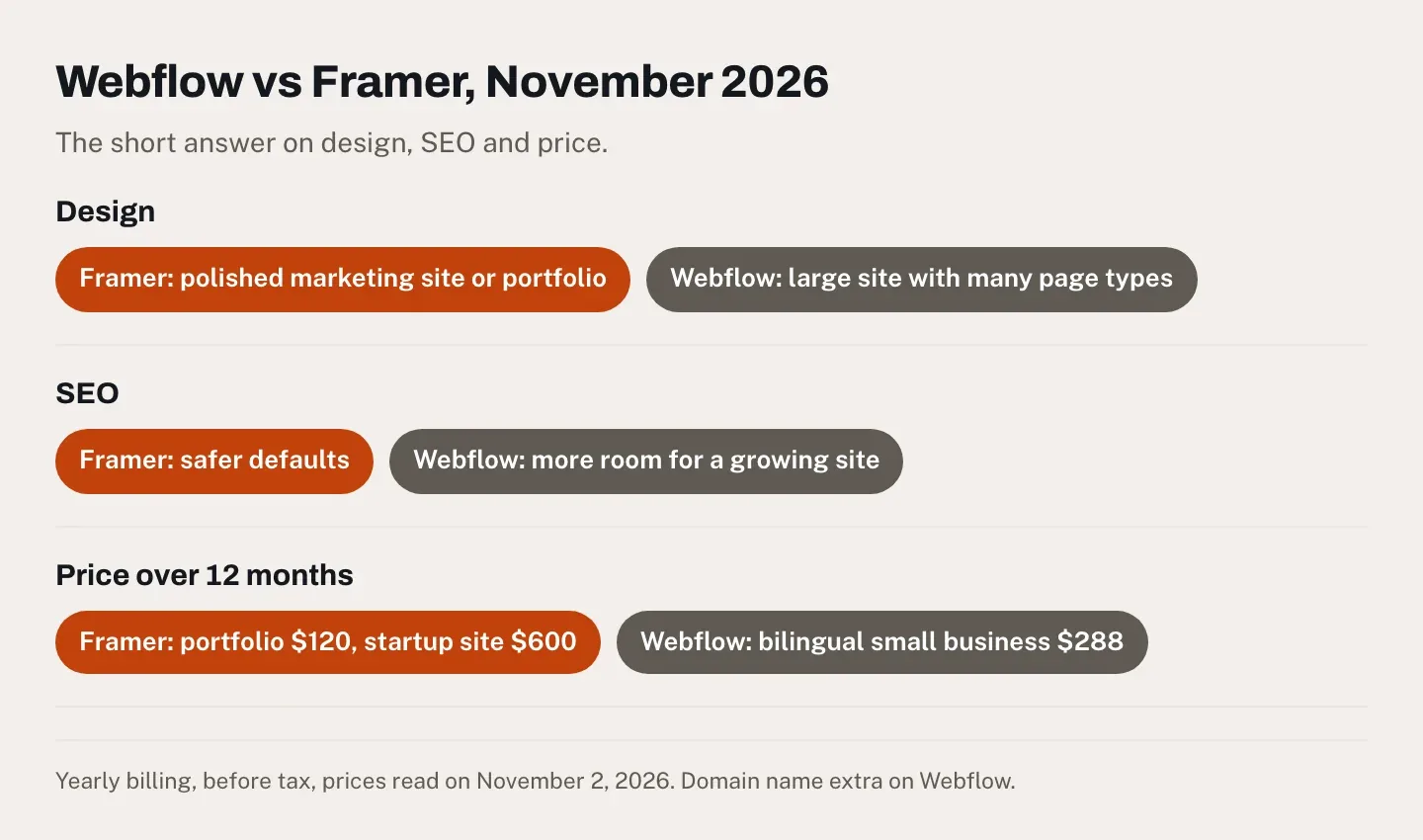
Your next website will spend at least a year on Webflow or Framer, so before you commit, you want to know which one gives you the better design, the better chance on Google and the smaller bill. This Webflow vs Framer comparison answers all three. Design depends on the site: Framer wins for a polished marketing site or a portfolio, Webflow for a large site with many page types. On SEO, Framer's defaults are safer, and Webflow keeps a small lead once a site publishes every week. On price, Framer costs less for a portfolio and for a startup site with two editors, while Webflow costs less for a small business in two languages.
Every figure behind those verdicts can be checked. On November 2, 2026, I read both companies' pricing pages and help centers and priced three kinds of site over 12 months. Our team pulled Google's field data for September 2026 and checked 159 live home pages, 80 built with Webflow and 79 with Framer, drawn at random from a research list of the top million websites.
I founded Eqlo, which competes with both, so weigh what follows with that in mind. I've built sites on each of them, most recently a six-page site for a made-up B2B consultancy on Framer in September 2026, which our Framer AI review covers in full. My impressions match what you'll read on the forums, so this article leans on dated sources rather than on my memory. Eqlo gets one marked section near the end.
Webflow vs Framer: the quick verdict
Framer is the better pick for a portfolio or a marketing site of up to 30 designed pages, which it lets you design faster and host for $120 a year. Webflow suits a site that will outgrow Framer's CMS or must keep an older site's addresses, and anyone who wants the option of leaving with the code.
Choose Framer if:
- you design in Figma and want the live site to match the mockup, motion included;
- it's a portfolio or a marketing site of up to 30 designed pages, since Basic costs $120 a year billed yearly, with a domain free the first year;
- the people who update the site only touch the content, at $10 a month each against $15 for a Webflow Limited seat;
- you'd rather have the search basics set for you: all 79 Framer sites in our check had a canonical tag, against 52 of the 80 Webflow sites.
Choose Webflow if:
- the site will grow, since Premium holds 20,000 CMS items for $25 a month billed yearly, against 2,500 on Framer Pro for $30;
- you're moving an existing site and need redirects, which come with every paid Webflow site plan;
- you want a way out: code export starts with the Core Workspace at $19 a month, and CMS content leaves as CSV files;
- you want to sell online, with ecommerce plans from $29 a month, where Framer's plans include no store.
My short version: Framer for a site that has to impress, Webflow for a site that has to grow.
The comparison at a glance
| Webflow | Framer | |
|---|---|---|
| Design, polished marketing site or portfolio | Full control, longer to learn | Faster, on a Figma-like canvas |
| Design, large site with many page types | Reusable classes, 40 CMS collections | 10 CMS collections on Pro |
| Search basics on live sites, our check | Canonical tag on 65%, sitemap on 83% | Canonical tag on 100%, sitemap on 96% |
| Room for a growing site | 20,000 CMS items, redirects on every paid plan | 2,500 items, redirects from Pro |
| Sites passing Core Web Vitals on mobile, September 2026 | 71.3% | 70.8% |
| Cheapest plan with your own domain, billed yearly | $15 a month, no CMS | $10 a month, CMS included |
| 12 months, freelance portfolio | $180 | $120 |
| 12 months, startup site with two editors | $660 | $600 |
| 12 months, small business in two languages | $288 | $360 |
| Taking the site elsewhere | Code export from $19 a month | No export of the site |
Prices in US dollars before tax, read on November 2, 2026. The 12-month cases are worked out in the pricing section.
How I compared them
I read Webflow's and Framer's pricing pages and help centers on November 2, 2026, from a US connection. Both companies publish a comparison page that ranks for this search, and I used neither for facts about the other. Speed comes from HTTP Archive, which compiles what real Chrome users experienced on each platform's sites, here for September 2026.
For our own check, we started from the Tranco list, a ranking of the top million websites built for research, and opened 60,000 home pages drawn at random. Of the 39,910 that answered, 425 were built with Webflow and 84 with Framer. That ratio of five to one matches HTTP Archive's count of 60,687 Webflow sites and 11,646 Framer sites. We then drew 80 sites per platform, all on their owners' domains, fetched each home page as Chrome and as Googlebot, and rendered it in a real browser. One Framer site didn't answer, which leaves 79.
Keep two limits in mind. We checked home pages only, and much of what we measured depends on how each owner set up the site, so read the results as what each platform's defaults lead to in practice. Forum quotes come from the r/webflow thread that ranks for this search, "Webflow vs. Framer & Long term thinking," started on March 20, 2023, with replies until November 2025.
Design: Framer for a polished site, Webflow for a large one
Framer wins when the site has to look exceptional on a handful of pages, like a portfolio or a startup's launch site. Webflow wins when the design has to hold across dozens of page types and hundreds of CMS entries, because it makes you build the structure that keeps them consistent.
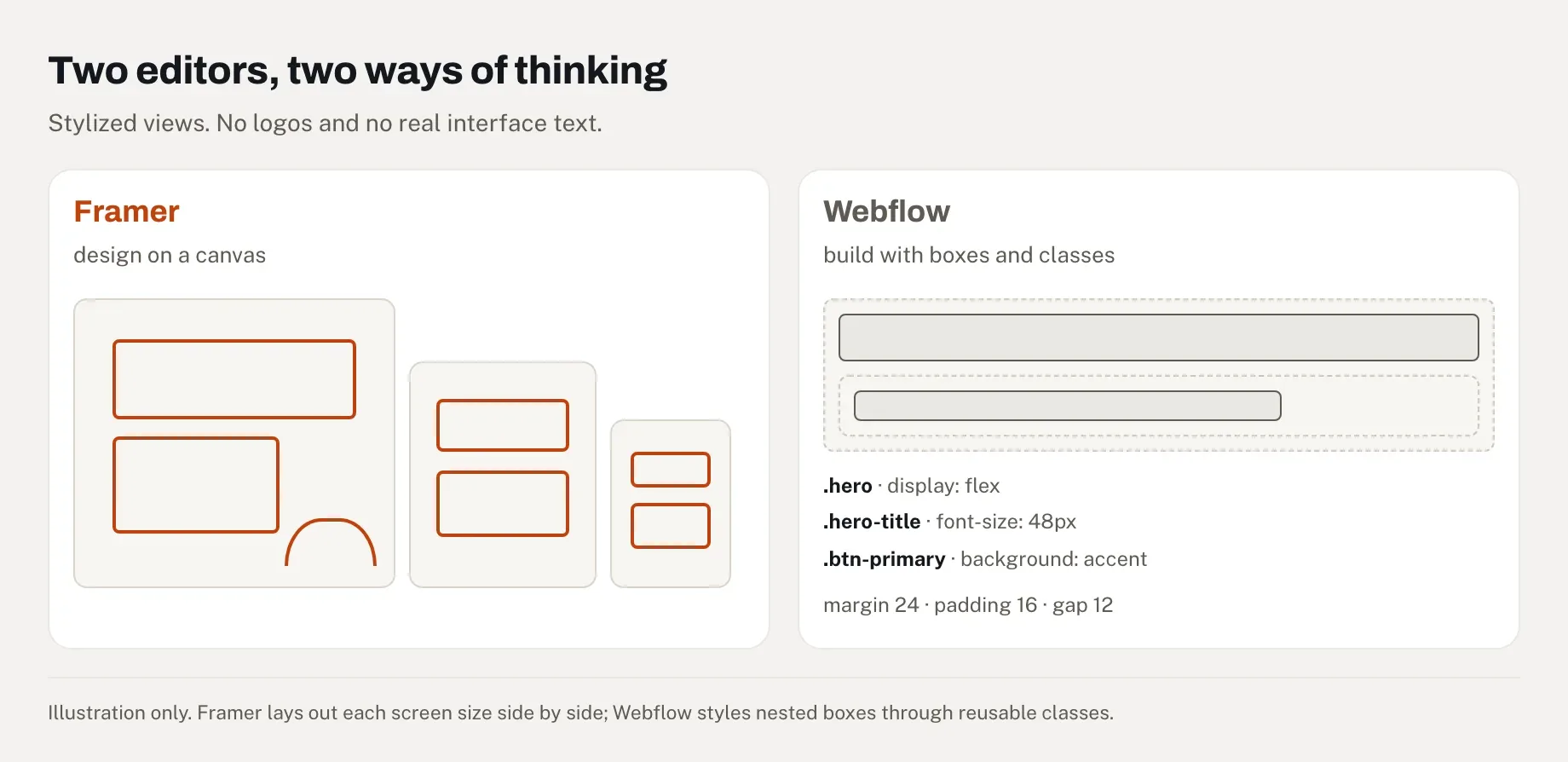
The two editors start from different places. Framer gives you a free canvas where you place and resize elements by hand, with each screen size laid out side by side, much as in Figma. Webflow builds a page the way the web does, as boxes nested inside boxes, each styled through reusable classes. Change a class once and every element that uses it follows. That pays off on a site of 80 pages and slows you down on a site of five.
A Reddit user summed up the learning curve in May 2024: "if you use Adobe products you will find Webflow easier. If you use Figma you will find Framer easier." Another explained in April 2024 why they don't use Webflow: "it's not a fully no-code tool, and I don't know how to code." You can build in Webflow without writing code, as long as you're willing to think in HTML and CSS.
Motion is Framer's home ground, with animations and ready-made interactive components you drop onto a page. Webflow has narrowed the gap: its interactions run on GSAP, the animation library it bought in October 2024 (Webflow), which gives fine control over timing in exchange for more settings. Templates lean Framer's way. In October 2026, Zapier counted more than 12,000 Framer templates, 7,500 of them free, against more than 11,000 for Webflow, about 160 of them free (Zapier).
Both tools now draft pages with AI and bill it in credits. On Framer, my consultancy's home page appeared in about 50 seconds and the site was live by the end of the first week, but Basic's 1,000 monthly credits ran out before the month did, and I bought 2,000 more for about $30. Since June 2026, Framer also takes edits from AI tools you already pay for, such as Claude Code or Cursor, without spending its credits (Framer). Zapier's tester found Webflow's AI builder more thorough and Framer's faster, with Webflow stopping a first AI build at five pages. My builds point the same way as the forums: Framer gets you to a good-looking page sooner, and Webflow asks for more work up front, then gives more control back.
Webflow vs Framer for SEO: Framer's defaults, Webflow's room to grow
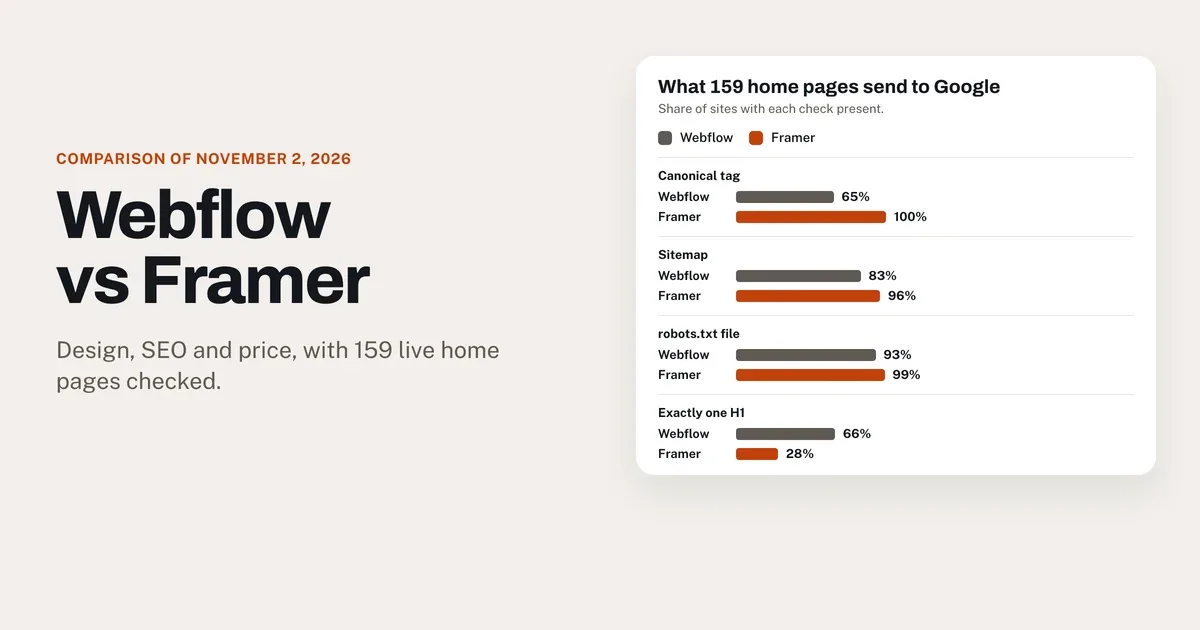
Both tools send Google complete pages: in our November 2026 check, 98% of Webflow home pages and 96% of Framer's carried their full text in the first HTML response. Framer fills in more of the basics, starting with the canonical tag. Webflow gives a growing site more room, with 20,000 CMS items and redirects on every paid plan.
I expected Webflow to win this section outright, because that's what my own sites and most forum regulars suggest. The check changed my mind for small sites. On a site of a few pages, call it a tie, with Framer's defaults a little safer. On a site that publishes every week, Webflow keeps a small lead.
What Google receives from each
| Home page check, November 2, 2026 | Webflow, 80 sites | Framer, 79 sites |
|---|---|---|
| Full text in the first HTML response | 78 (98%) | 76 (96%) |
| Meta description | 78 (98%) | 78 (99%) |
| Canonical tag | 52 (65%) | 79 (100%) |
| Sitemap | 66 (83%) | 76 (96%) |
| robots.txt file | 74 (93%) | 78 (99%) |
| Structured data | 42 (53%) | 31 (39%) |
| llms.txt file | 25 (31%) | 22 (28%) |
| Exactly one H1 in the HTML | 53 (66%) | 22 (28%) |
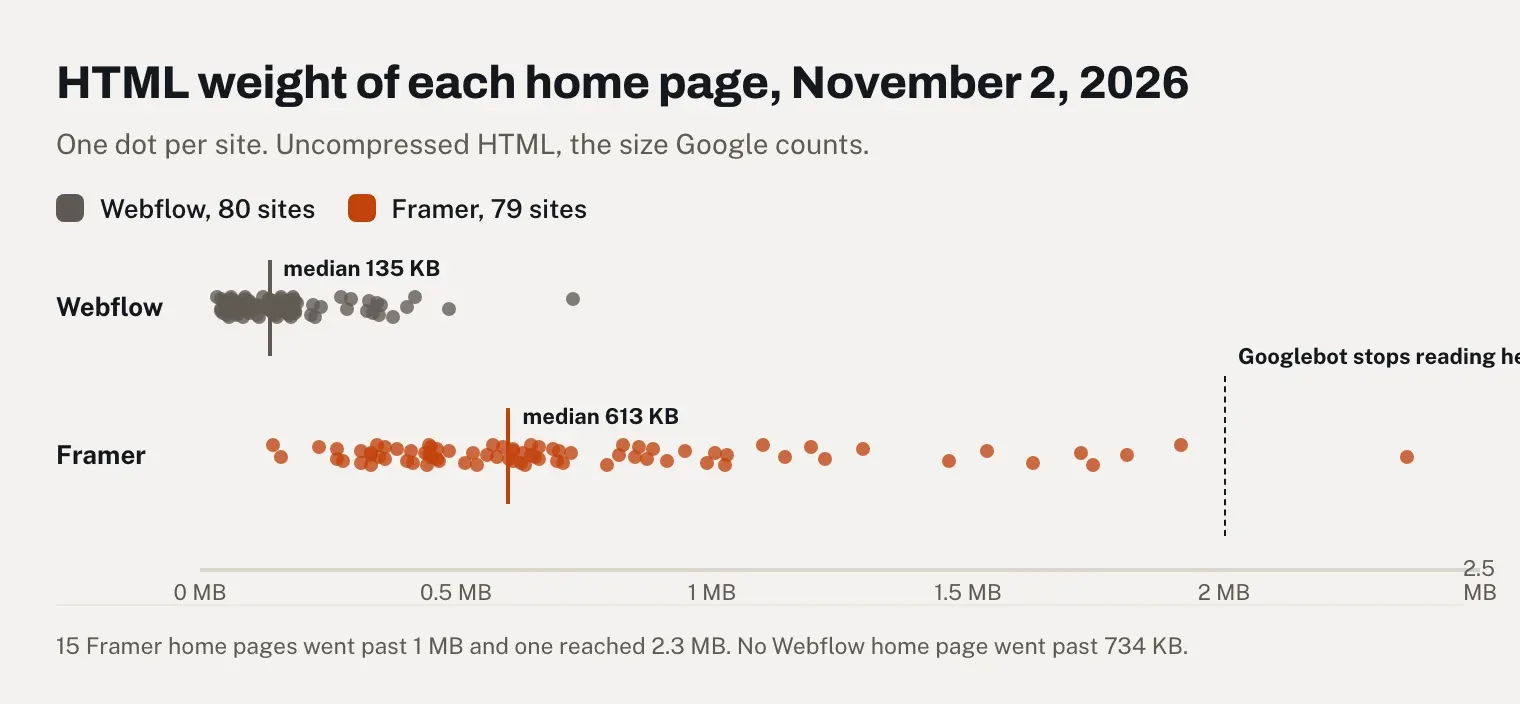
| Median HTML weight | 135 KB | 613 KB |
"Full text" means at least 80% of the words a visitor sees, already in the HTML before any JavaScript runs, which is what pre-rendering gives you. Every site had a title. Two Webflow sites and three Framer sites asked search engines not to index their home page.
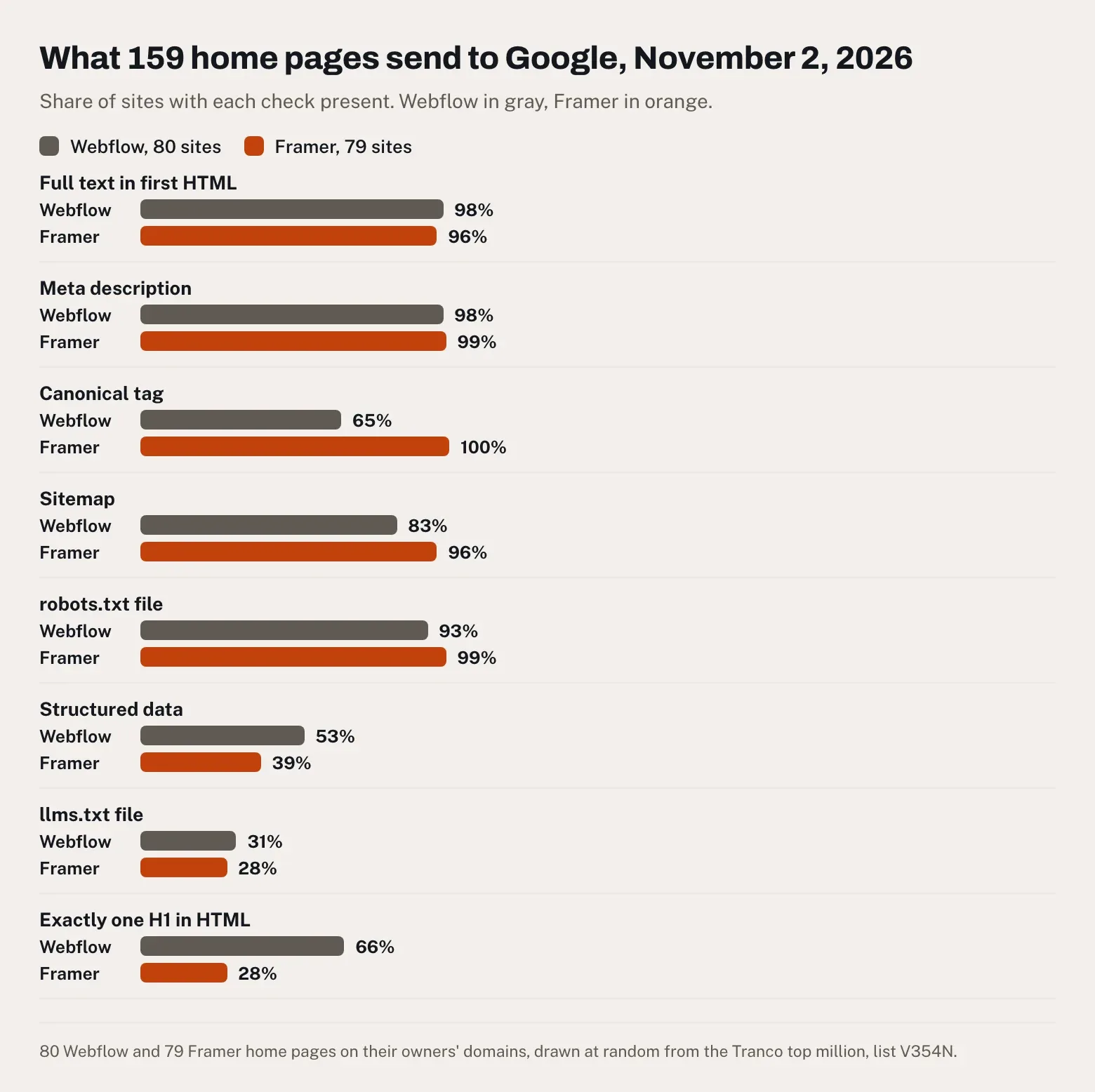
Webflow's main gap is a setting left empty. A canonical tag tells Google which address is the official one when a page can be reached several ways. Webflow generates one for every page once you fill in the "Global canonical tag URL" field in the site settings (Webflow help), and 28 of our 80 Webflow sites had none in their HTML. Without it, search engines may pick the official address themselves, as that same help page warns. Framer creates the sitemap and the robots.txt file automatically (Framer help), and every Framer site we checked had its canonical tag.
Framer's weak spot is the weight of its pages. On the pages we opened, Framer writes a section once per screen size and hides the copies that don't apply, so the same H1 can appear two or three times in the HTML. Only 22 Framer home pages had exactly one H1 in their code, while 48 showed exactly one on a desktop screen. The copies also add weight: a median of 613 KB of HTML per home page, against 135 KB on Webflow. Googlebot reads the first 2 MB of an HTML file for Search, and only what it downloaded counts for indexing (Google). Fifteen of our 79 Framer home pages went past 1 MB and one reached 2.3 MB. No Webflow home page went past 734 KB.
Structured data, code that describes the page to search engines as a business or a product, is up to you on both platforms. Framer's help center shows how to add it as custom code (Framer help), and Webflow includes the setting on its paid plans. In our sample, Webflow sites carried it more often, 53% against 39%. The llms.txt file, a summary of the site written for AI tools, appeared on about 3 sites in 10 on each platform, and every one we opened had been written by hand. Webflow lets you upload one on any paid site plan (Webflow help), while Framer keeps it for Pro (Framer help). Webflow's own help page calls the format experimental and its effect on AI search unclear.
Image descriptions are the weak point on both. Almost every image on these home pages had an alt attribute, the text that search engines and screen readers read, but most were left empty: 55% on Webflow and 65% on Framer. An empty description is right for a decorative shape and a loss for a product photo or a case study. Only 6 Webflow sites and 3 Framer sites described every image. Whichever tool you use, our free index check shows the title, the H1 and the text Google receives from a page.
Speed on real phones
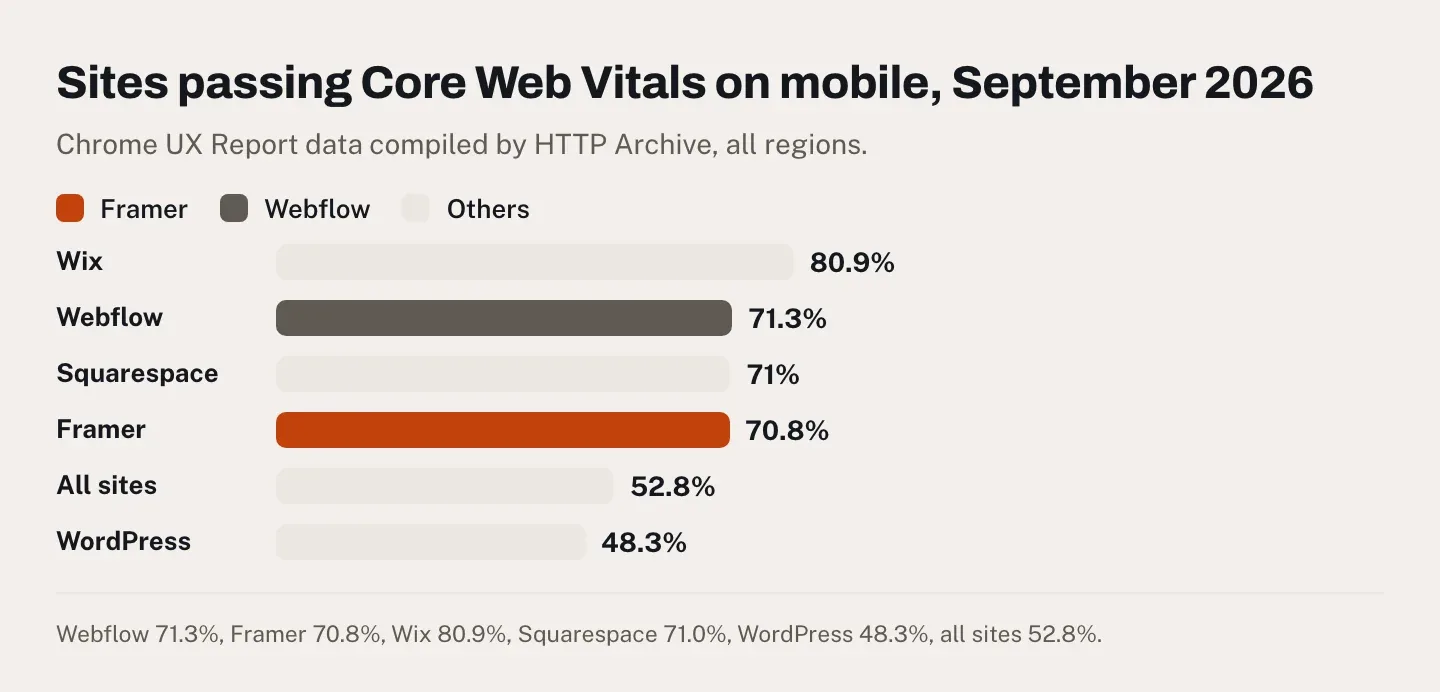
The two are level. In September 2026, 71.3% of Webflow sites and 70.8% of Framer sites passed Google's Core Web Vitals on mobile, against 52.8% for all sites. Those are Google's measures of loading speed, responsiveness and visual stability, taken from real Chrome users. Framer shows the main content faster, with 83.4% of its sites in the "good" range against 78.6%. Webflow reacts better to taps, at 88.0% against 80.3%. On desktop, Framer leads, 87.9% against 82.6%.
Lighthouse, Google's automated audit, gives the median Framer site 100 out of 100 for SEO on mobile and the median Webflow site 96. That score checks basics such as titles and image descriptions, so it reflects setup more than ranking power.
What a growing site needs
Webflow's lead comes from capacity. Premium includes 40 CMS collections and 20,000 items for $25 a month. Framer Pro includes 10 collections and 2,500 items for $30, then sells 10 more collections for $40 a month, up to 40, and 10,000 more items for $20, up to 40,000. Matching Webflow on Framer costs $30 + (3 × $40) + (2 × $20) = $190 a month, the figure Zapier reached too. The Webflow sites in our sample were also bigger, with sitemaps listing a median of 361 addresses against about 50 for Framer.
Redirects are the other gap. A 301 redirect sends visitors and Google from an old address to the new one, and you need it as soon as you move a site or rename pages. Webflow includes redirects in every paid site plan (Webflow pricing), and Framer keeps them for Pro (Framer pricing). Our guide to redesigning a site without losing your rankings explains the redirect plan step by step.
For a second language, both add hreflang tags, which tell Google which page is the translation of which. Framer translates page addresses with its language add-on (Framer help), while Webflow keeps translated addresses for Localize Advanced. Webflow's tools for answer engines such as ChatGPT, which Zapier rates as more mature, come with the Team plan at $2,500 a month, out of reach for the sites in this article.
Webflow vs Framer pricing: three sites over 12 months
Framer costs less for the portfolio and the startup site, and Webflow for the small business in two languages, unless that business wants translated page addresses. The forums describe a wider gap. In May 2024, a reply in the Reddit thread said you get "about twice as many features in Webflow, but then you pay twice as much." On 2026 prices, the difference is smaller, and seats can reverse it. These are the plans that matter, on November 2, 2026:
| Webflow | Framer | |
|---|---|---|
| Free plan | webflow.io address, 2 static pages | Framer address, 500 AI credits to try |
| Entry plan with your own domain | Basic: $15 a month billed yearly, $25 monthly; 300 static pages, no CMS | Basic: $10 billed yearly, $15 monthly; 30 designed pages, 2 CMS collections |
| Plan with a full CMS | Premium: $25 billed yearly, $39 monthly; 40 collections, 20,000 items | Pro: $30 billed yearly, $45 monthly; 10 collections, 2,500 items |
| Each extra person, per month, billed yearly | Full seat $39, Limited seat for content $15 | Editor $20, content editor $10 |
| Each extra language, per month | Localize Essential $9, up to 3; Advanced $29, up to 10 | $20, up to 20 |
| Domain name | Not included | Free the first year on yearly billing |
| Redirects | Every paid site plan | Pro only |
From Webflow's pricing page and its May 2026 pricing update, and from Framer's pricing page and domains page, before tax. On Framer, pages generated by the CMS don't count toward the page limit (Framer). I paid $15 a month for Framer Basic, billed monthly, in September 2026.
The three cases below use yearly billing, before tax.
A freelance portfolio
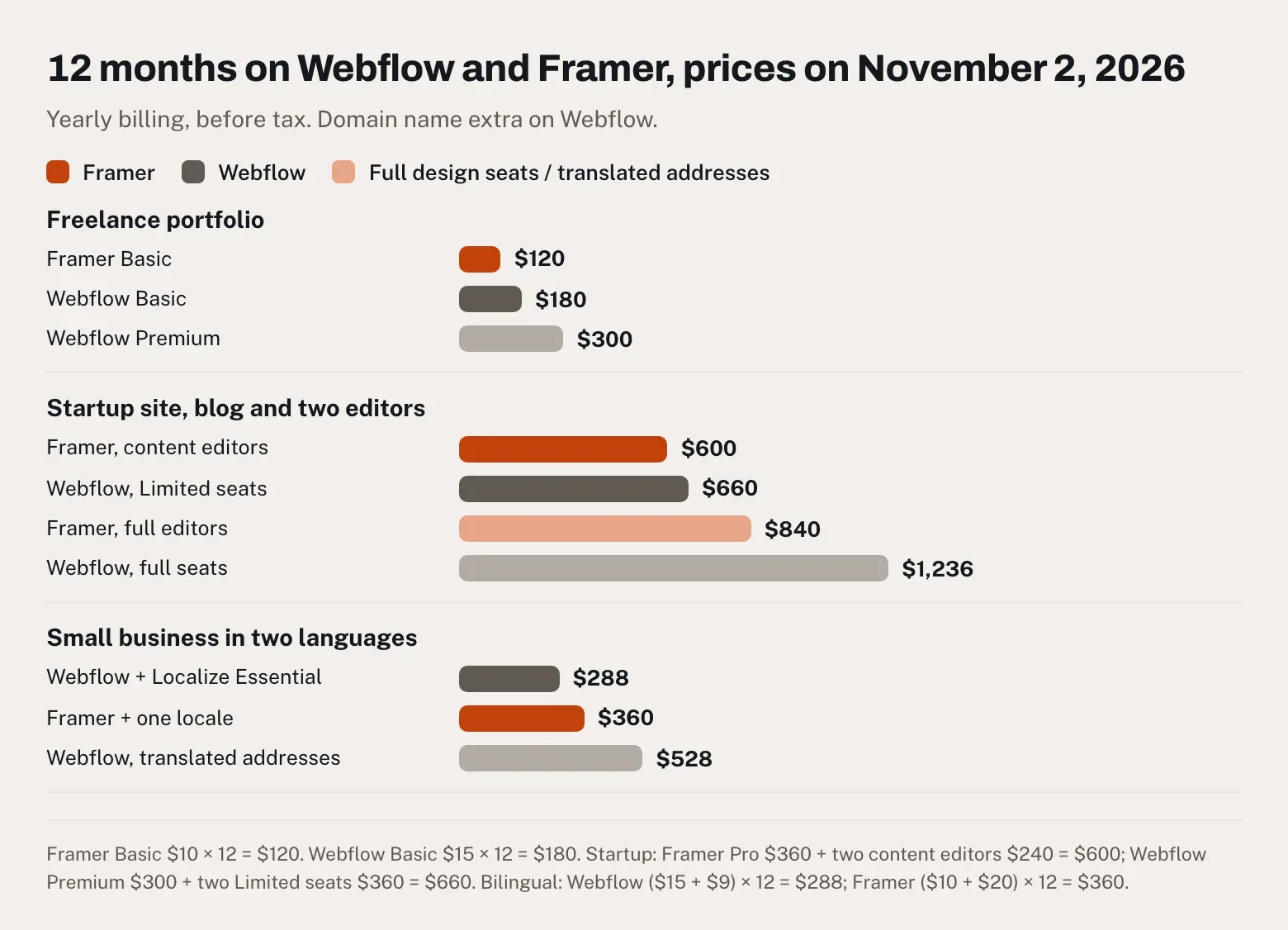
One person, a dozen case studies, your own domain. Framer Basic costs $10 × 12 = $120, with the case studies in its CMS. Webflow Basic costs $15 × 12 = $180 if you build each case study as a page by hand, since Basic has no CMS. With the case studies in a CMS, Webflow Premium costs $25 × 12 = $300. On Webflow, add the price of a domain name. Framer wins, $120 against $180 to $300.
A startup site with a blog and two editors
A founder owns the site, two teammates write the posts, and the plan needs redirects because the startup is leaving an older site. Framer Pro costs $30 × 12 = $360, plus two content editors at 2 × $10 × 12 = $240, so $600. Webflow Premium costs $25 × 12 = $300, plus two Limited seats at 2 × $15 × 12 = $360, so $660, with the owner's seat included in the free Workspace. If both teammates also need to change the design, Framer comes to $360 + (2 × $20 × 12) = $840 and Webflow to $300 + (2 × $39 × 12) = $1,236. Framer wins, $600 against $660, or $840 against $1,236.
That result runs against a complaint you'll find in the same thread. In November 2025, a user who had built on both wrote that Framer's "cost is higher than Webflow. Especially for collaboration." The comment predates a price cut: Framer charged $40 a month per editor until June 16, 2026, then $20 (Framer).
A small business in two languages
A ten-page site for a dental clinic in English and Spanish, without a blog. Webflow Basic with Localize Essential comes to ($15 + $9) × 12 = $288, including 10,000 words of AI translation per language each month. Framer Basic with one extra language comes to ($10 + $20) × 12 = $360, and its AI translation draws on the plan's 1,000 monthly credits. Webflow wins, $288 against $360. The order flips if you want translated addresses, /es/servicios rather than /es/services. Webflow then needs Localize Advanced, at ($15 + $29) × 12 = $528, while Framer translates addresses for the same $360.
The gotchas in the pricing pages
- Monthly billing costs more on both. Webflow Basic goes from $15 to $25 a month and Framer Basic from $10 to $15, so the portfolio costs $300 or $180 over a year.
- Webflow Basic has no CMS. A blog, or case studies kept in a collection, need Premium.
- Framer Basic has no redirects. Moving a site that already ranks means Pro.
- Framer bills a new editor within 24 hours, according to its pricing FAQ, while viewers are free. Check the role before you invite someone.
- Webflow's 2026 prices are still rolling out. New purchases switched on May 13, 2026 and existing sites from June 29. Sites in Freelancer or Agency Workspaces, and plans bought in 2022 or earlier, follow from November 16, 2026, and switching to yearly billing before your date keeps the current price for another year. If an agency manages your site, ask what the next renewal will cost.
- Bandwidth is tighter on Webflow's entry plan, with 10 GB a month on Basic against 50 GB on Framer Basic.
Our guide to what a website costs in 2026 puts these figures next to agency and freelance quotes.
Export and lock-in: the long-term question
The Reddit thread was started by someone about to "go all in on learning Webflow," who wondered which tool "might be a safer bet for long term planning." Three and a half years later, the answer depends on what you mean by safe.
If safe means being able to leave, Webflow is ahead. From the Core Workspace at $19 a month billed yearly, you can download the site's HTML, CSS, JavaScript and images and host them anywhere. The export leaves out CMS content, translations, form handling and site search, and CMS collections leave separately as CSV files (Webflow help).
Framer's help center contradicts itself on this point. One article, updated September 15, 2026, says every Framer site is published as standard HTML, CSS and JavaScript, cites the EU Data Act and promises you can "Download your full Framer site and host it anywhere" (Framer help). Another, updated the same day, answers: "No. Framer does not provide a way to export published sites as HTML files or static website bundles," and explains that features such as image resizing and server-side rendering run on Framer's servers (Framer help). The first article describes no download button, so plan on the second. CMS content, at least, leaves as CSV or JSON through plugins, which dates one 2023 reply in the thread ("You can't even export your CMS in Framer"). The rest of that argument stands, and a November 2025 reply sums it up: "If you ever want to leave Framer, you're rebuilding the entire site from scratch." Our glossary explains what a full repository export contains.
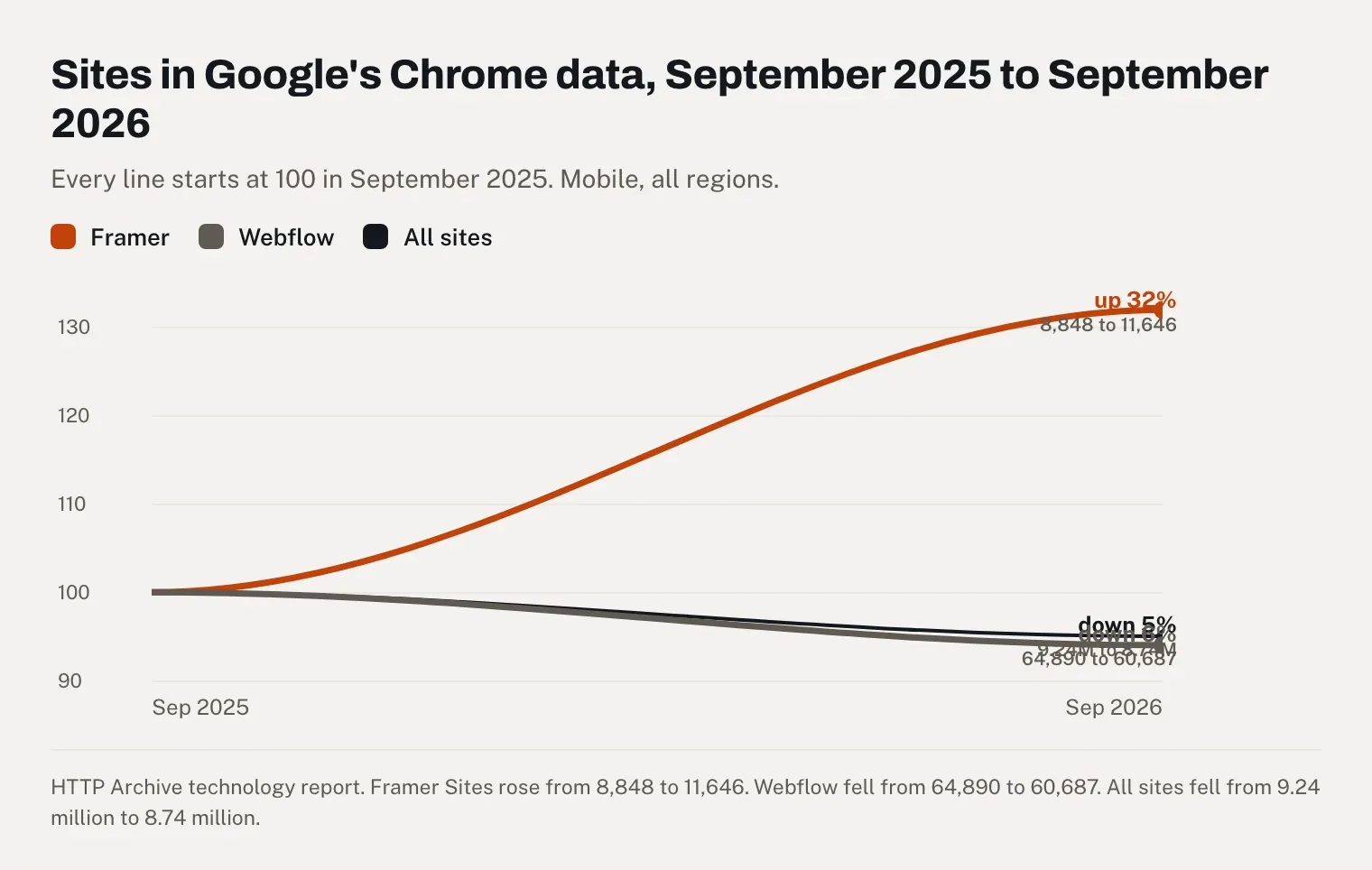
If safe means betting on the tool with momentum, Framer is growing faster. The number of Framer sites with enough Chrome traffic to appear in Google's public data rose from 8,848 in September 2025 to 11,646 in September 2026, up 32%. Webflow's fell from 64,890 to 60,687, down 6%, a little more than the 5% drop across all sites in the dataset (HTTP Archive). Webflow still has five times as many. In October 2023, a reply in the thread from a former agency owner, who had charged 15,000 to 25,000 euros per project, noted that most of the San Francisco founders around them had sites built on Framer.
Webflow vs Framer for a portfolio
For most designers, Framer. A portfolio is a small site that has to look exceptional, which is what Framer does best, and Basic covers it for $120 a year. Put the case studies in the CMS: Framer's 30-page limit applies to the pages you design, so a portfolio can grow to 1,000 projects on Basic.
Before you publish, check two things. A portfolio is mostly images, and on the Framer sites we checked, two images in three had an empty description, so write yours. And a portfolio heavy with motion is where Framer's slower response to taps shows first, so try it on a mid-range phone.
Webflow makes more sense if your portfolio is also your pitch for Webflow work. A reply in the 2023 thread put the agency logic plainly: "the more popular a product, the more clients will trust it." Webflow also suits a portfolio that will grow into dozens of projects filtered by category, where Premium's 40 collections earn their $25 a month.
Webflow and Framer vs WordPress, Wix and Squarespace
| Webflow | Framer | WordPress | Wix | Squarespace | |
|---|---|---|---|---|---|
| Cheapest plan with your own domain, per month, billed yearly | $15 | $10 | $4 on WordPress.com | $17 | $19 |
| Selling online | From $29 a month | No built-in store | Payment buttons from $8, WooCommerce on Business | From $29 a month | From $19, with a 2% fee |
| Sites passing Core Web Vitals on mobile, September 2026 | 71.3% | 70.8% | 48.3% | 80.9% | 71.0% |
| Median Lighthouse SEO score, mobile | 96 | 100 | 92 | 96 | 92 |
| Sites in Google's Chrome data, September 2026 | 60,687 | 11,646 | 2,714,694 | 181,912 | 92,778 |
Prices read on November 2, 2026 on the pricing pages of WordPress.com, Wix and Squarespace, before tax. Field data from HTTP Archive, where WordPress covers every WordPress site, on WordPress.com or any other host.
Webflow or Framer vs WordPress
WordPress is the pick for a large blog or a site you want to own outright. The software is free and runs on any host, and on WordPress.com, Personal costs $4 a month billed yearly, with a domain free the first year and no charge per user. The price is upkeep, with themes and plugins to keep updated, and only 48.3% of WordPress sites pass Core Web Vitals on mobile, the lowest of the five. Choose Webflow over WordPress for visual control without plugins, and Framer for a small site that has to look designed.
Webflow or Framer vs Wix
Wix is the easier start if you've never used a design tool and want to sell or take bookings. Light costs $17 a month billed yearly and can't take payments, and Core adds them at $29 (Wix help). Wix sites also had the best field data of the five, with 80.9% passing Core Web Vitals on mobile. Framer and Webflow give a designer far more control over the layout, and our Framer review compares Framer and Wix point by point.
Webflow or Framer vs Squarespace
Squarespace sits between the two worlds, with polished templates you adjust rather than a blank canvas. Basic costs $19 a month billed yearly, or $25 monthly, and already sells online with a 2% transaction fee, which drops to 0% from Core at $29. Its sites pass Core Web Vitals on mobile about as often as Webflow's and Framer's, at 71.0%, but the median one scores 30 out of 100 in Lighthouse's performance audit on mobile, against 63 for Webflow and 67 for Framer. Squarespace suits a good-looking site built in a weekend. Pick Webflow or Framer when the design has to be your own.
Pros and cons of each
What Webflow does well:
- Room to grow, with 20,000 CMS items and 40 collections on Premium for $25 a month.
- Redirects and an llms.txt upload on every paid site plan.
- Code export from $19 a month, which Framer doesn't offer.
- Lighter pages, with a median of 135 KB of HTML on the home pages we checked.
- A built-in store, from $29 a month.
Where Webflow falls short:
- A longer learning curve, with nested boxes and classes to understand.
- No CMS on Basic, so a blog starts at $25 a month.
- SEO settings to fill in yourself: 28 of the 80 sites we checked had no canonical tag.
- Full seats at $39 a month each.
What Framer does well:
- The shortest path from a Figma mockup to a live, animated site.
- Safe defaults, with a canonical tag on all 79 sites we checked and a sitemap on 76.
- Cheap for small sites: $120 a year on Basic, with a domain free the first year.
- Editors at $20 a month and content editors at $10.
Where Framer falls short:
- No export of the site, only of the CMS content.
- Heavy HTML, with a median of 613 KB per home page, and one of 79 past Google's 2 MB cutoff.
- Redirects and llms.txt only from Pro, which holds 2,500 CMS items.
- AI credits that run out during a build.
Where Eqlo fits, if you'd rather describe your business than design pages
This is my product, so read this section as such. Webflow and Framer both expect you to design the pages. Eqlo is an AI website builder that starts from one sentence about your business, writes the pages and the copy, then publishes the site with its own admin, where blog posts can be scheduled ahead. For designers, there's the portfolio website builder, and for a clinic or a trade, the small business website builder.
The checks that slipped in our sample are the ones Eqlo runs before a page goes live: one H1 per page and a description on every image, with pages that display without JavaScript. Every site gets its title, description, canonical address, structured data, sitemap, robots.txt and llms.txt automatically, and you can add 301 redirects. A shop with Stripe and online bookings come with every plan, with no commission taken on sales. Every plan, Free included, can also send a complete Next.js project to your GitHub.
On November 2, 2026, Free costs $0 for five projects on an eqlo.dev address with $3 of AI a month, and Plus costs $19 a month with your own domain, three seats and $30 of AI (Eqlo pricing), so $228 over 12 months before the domain. Visitors aren't counted. If designing every pixel on a canvas is what you enjoy, Webflow or Framer remains the better fit.
Frequently asked questions
Which is better, Webflow or Framer?
For a portfolio or a marketing site of a few pages, Framer: it's faster to design in and costs $120 a year on Basic. For a site that will publish often or move from an older platform, Webflow, thanks to its bigger CMS and its redirects on every paid plan. Framer's SEO defaults are safer, so on Webflow, fill in the canonical setting before you publish.
Is Framer cheaper than Webflow?
Usually, yes. Framer's entry plan costs $10 a month billed yearly, against $15 for Webflow's, and it includes a CMS that Webflow Basic lacks. In our three cases, Framer cost less for a portfolio ($120 against $180) and for a startup site with two editors ($600 against $660). Webflow won the bilingual small business, $288 against $360, because its first translation tier costs $9 a month per language instead of $20.
Can I move a site from Framer to Webflow?
You can, by rebuilding it. Framer doesn't export the site in a form Webflow can import, so the design has to be recreated in Webflow, while the CMS content leaves Framer as a CSV file through a plugin and goes into Webflow's CMS. Set 301 redirects for every address that changes, and budget for Webflow Premium if the content lives in a CMS.
Is Framer replacing Webflow?
Not on the numbers, though it's catching up. Framer's sites in Google's Chrome data rose 32% between September 2025 and September 2026, while Webflow's fell 6%. Webflow still had 60,687 such sites in September 2026, five times Framer's 11,646. A Reddit user predicted in September 2024 that Framer "probably will overrun Webflow," and two years later it hasn't.
Do you need to know how to code to use Webflow?
No, though it helps to understand how a web page is built. Webflow's editor follows the logic of HTML and CSS, boxes inside boxes styled through reusable classes, so someone who has only used Figma has more to learn than on Framer. Custom code is optional on both.
My verdict
Pick Framer if the site's main job is to look exceptional and it will stay small, like a portfolio or a startup's first site, at $120 to $600 for the year in our cases. Pick Webflow if the site will grow into a busy blog or a catalog, or if you want the option of leaving with your code, and expect to spend longer learning the editor and filling in the SEO settings that Framer handles for you. Whichever you choose, open the HTML of your published home page before you share it, and count the H1s.
Sources: Webflow's and Framer's pricing pages, help centers and announcements, read on November 2, 2026; the HTTP Archive technology report for September 2025 and September 2026; our check of 80 Webflow and 79 Framer home pages drawn from Tranco list V354N, run on November 2, 2026; the r/webflow thread "Webflow vs. Framer & Long term thinking," with replies from March 2023 to November 2025; Zapier's comparison, updated in October 2026; the pricing pages of WordPress.com, Wix and Squarespace, read on November 2, 2026; my own month on Framer in September 2026. This comparison was put together on November 2, 2026 from each company's public offers. If you spot an error, write to hello@eqlo.app and we'll correct it.